
Comparing Kafka Schema Registries
A comprehensive comparison of schema registry solutions for Apache Kafka, and why enterprises are choosing a new approach
Introduction
As organizations scale their Apache Kafka deployments, schema management becomes critical. Schema registries ensure that producers and consumers agree on data formats, preventing data corruption and enabling safe schema evolution. But not all schema registries are created equal.
In this post, we’ll compare the leading schema registry solutions—Confluent Schema Registry, Karapace, Apicurio, and our own AxonOps Schema Registry—to help you choose the right solution for your needs.
The Schema Registry Landscape
Confluent Schema Registry
Confluent Schema Registry is the original and most widely deployed solution. It’s tightly integrated with the Kafka ecosystem and offers excellent compatibility guarantees.
Pros:
- Battle-tested in production
- Excellent documentation
- Strong community support
Cons:
- Requires Kafka for storage (coordination overhead)
- Enterprise features require commercial license
- Heavy resource footprint (~500MB+ RAM)
- Limited authentication options in OSS version
Karapace
Developed by Aiven, Karapace is a Python-based drop-in replacement for Confluent Schema Registry.
Pros:
- Apache 2.0 license
- Confluent API compatible
- Lightweight compared to Java
Cons:
- Still requires Kafka for storage
- No built-in authentication or RBAC
- Python runtime dependencies
- Limited enterprise features
Apicurio Registry
Red Hat’s Apicurio is a general-purpose schema/API registry with Kafka schema registry compatibility.
Pros:
- Multiple storage backends
- Supports more than Kafka use cases
- OIDC/Keycloak integration
Cons:
- More complex deployment
- JVM-based (~300MB RAM)
- Kafka storage still requires Kafka running
- Broader scope may be overkill for Kafka-only use
Introducing AxonOps Schema Registry
We built AxonOps Schema Registry to address the gaps we saw in existing solutions. Our design principles were:
- No Kafka Dependency — Use proven databases for storage
- Enterprise Security Built-in — Not as a paid add-on
- Lightweight & Fast — Single binary, ~50MB RAM
- True Multi-DC Support — Active-active without complex setup
- Full Confluent Compatibility — Drop-in replacement
Feature Comparison
| Feature | AxonOps Open Source | Confluent OSS Open Source | Confluent Enterprise Commercial | Karapace Open Source | Apicurio Open Source |
|---|---|---|---|---|---|
| License | Apache 2.0 | Community License | Commercial $$$ | Apache 2.0 | Apache 2.0 |
| Storage Backends | PostgreSQL, MySQL, Cassandra, Memory | Kafka only | Kafka only | Kafka only | PostgreSQL, Kafka, Infinispan, Memory |
| Kafka Dependency | None | Required | Required | Required | Optional |
| Memory Footprint | ~50MB | ~500MB+ | ~500MB+ | ~200MB | ~300MB |
| Binary Distribution | ✓ Binary, RPM, DEB, Docker | Docker/JAR | Docker/JAR | Docker/pip | Docker |
| API Compatibility | Confluent v1 | Native | Native | Confluent | Confluent |
| Schema Types | Avro, Protobuf, JSON | Avro, Protobuf, JSON | Avro, Protobuf, JSON | Avro, Protobuf, JSON | Avro, Protobuf, JSON, OpenAPI, AsyncAPI |
Authentication Comparison
| Auth Method | AxonOps | Confluent OSS | Confluent Enterprise | Karapace | Apicurio |
|---|---|---|---|---|---|
| Basic Auth | ✓ | Plugin | ✓ | ✗ | ✓ |
| API Keys | ✓ with expiration | ✗ | ✓ | ✗ | ✗ |
| LDAP / Active Directory | ✓ | ✗ | ✓ | ✗ | ✗ |
| OIDC (Keycloak, Okta) | ✓ | ✗ | ✓ | ✗ | ✓ |
| mTLS | ✓ | ✓ | ✓ | ✓ | ✓ |
| RBAC | ✓ 4 roles | ✗ | ✓ | ✗ | ✓ |
Security Features Comparison
| Security Feature | AxonOps | Confluent OSS | Confluent Enterprise | Karapace | Apicurio |
|---|---|---|---|---|---|
| Rate Limiting | ✓ Token Bucket | ✗ | ✗ | ✗ | ✗ |
| Audit Logging | ✓ JSON format | ✗ | ✓ | ✗ | ✗ |
| TLS Auto-Reload | ✓ | ✗ | ✗ | ✗ | ✗ |
| HashiCorp Vault | ✓ | ✗ | ✗ | ✗ | ✗ |
| Secure Password Storage | bcrypt | N/A | N/A | N/A | N/A |
| API Key Encryption | SHA-256 + HMAC | N/A | N/A | N/A | N/A |
AxonOps Schema Registry Architecture
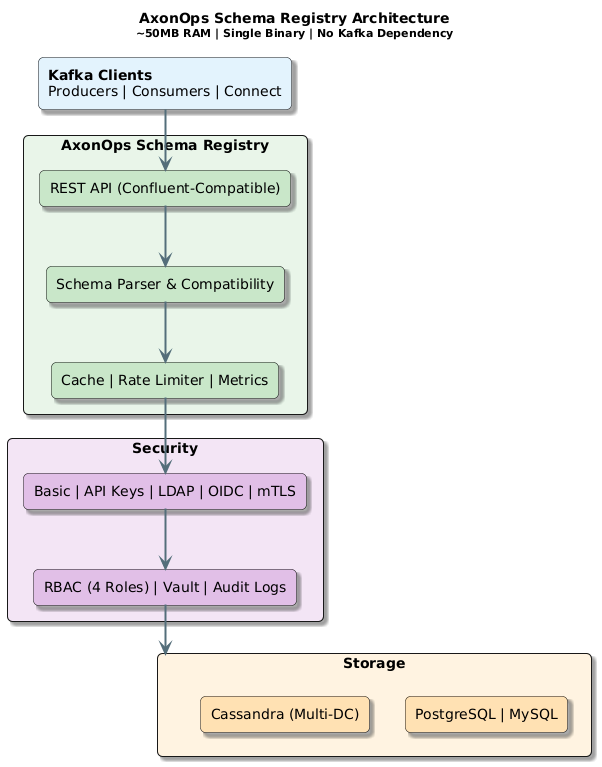
AxonOps Schema Registry Architecture: Lightweight, secure, and flexible
Why No Kafka Dependency?
One of our key design decisions was eliminating the Kafka dependency. Here’s why:
The Problem with Kafka-Based Storage
- Circular Dependency: You need the schema registry to serialize messages, but the schema registry needs Kafka to store schemas. This creates bootstrap complexity.
- Resource Overhead: Running Kafka just for schema storage means maintaining ZooKeeper/KRaft clusters, even if you only need a simple key-value store.
- Operational Complexity: Kafka storage requires understanding topics, partitions, replication—all for what is essentially a metadata store.
- Multi-DC Challenges: Cross-datacenter Kafka replication (MirrorMaker, Cluster Linking) adds significant complexity.
The AxonOps Approach
We use proven databases that your operations team already knows:
- PostgreSQL/MySQL: Perfect for single-DC or active-passive setups
- Cassandra: Native multi-DC replication for active-active deployments
- Memory: Zero-config for development and testing
Enterprise Security: Built-in, Not Bolt-on
Security shouldn’t require an enterprise license. AxonOps Schema Registry includes:
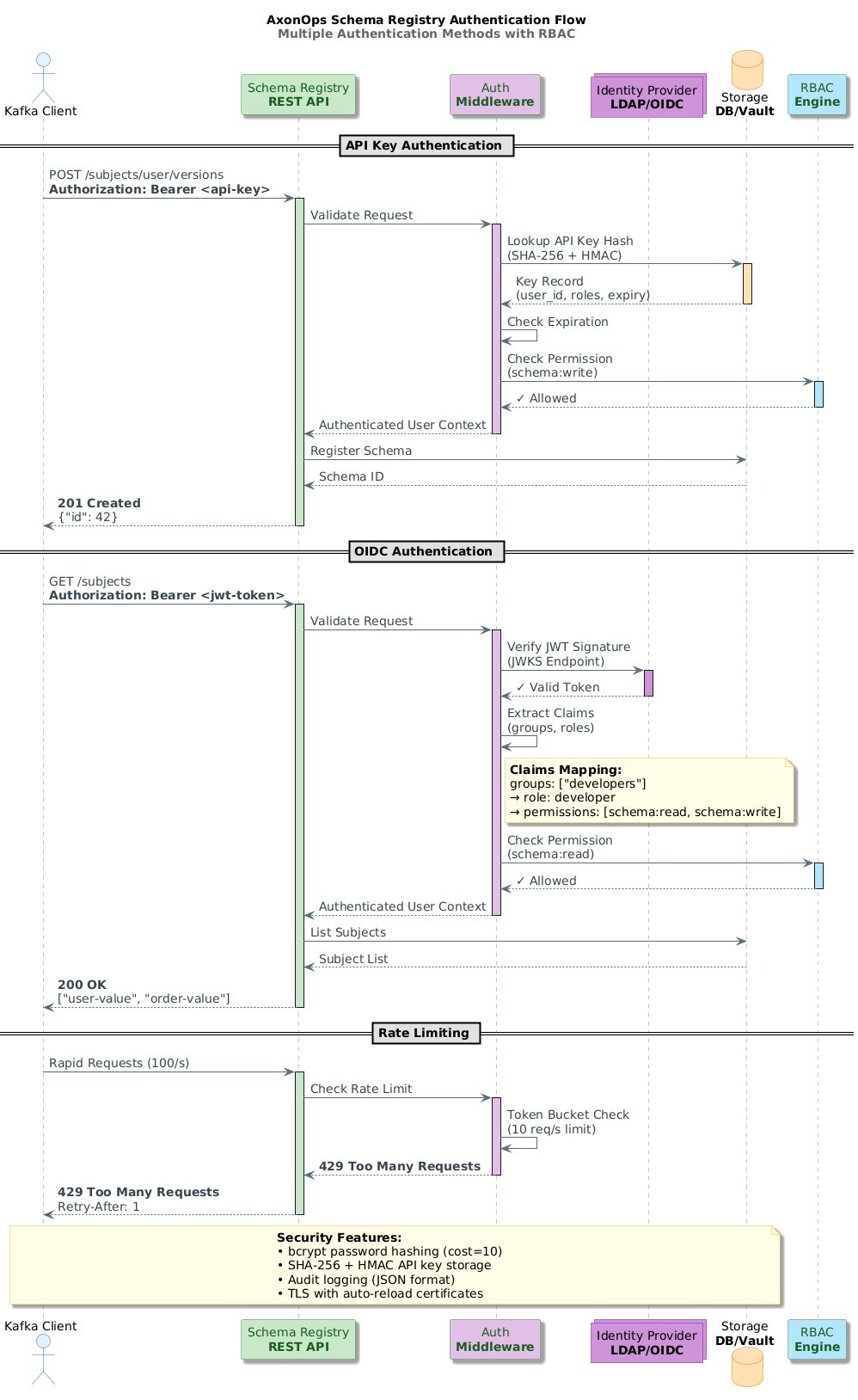
Multiple authentication methods with RBAC
Authentication Methods
API Keys with Expiration
auth:
 api_keys:
   enabled: true
   server_secret: "${HMAC_SECRET}"
# Optional HMAC pepper for defense-in-depth
API keys are stored using SHA-256 hashing with optional HMAC-SHA256 for additional security. Keys can have expiration dates and can be revoked instantly.
LDAP/Active Directory
auth:
 ldap:
   enabled: true
   url: "ldaps://ldap.example.com:636"
   base_dn: "dc=example,dc=com"
   user_search_filter: "(uid={0})"
   group_search_filter: "(member={0})"
   group_role_mapping:
     "cn=kafka-admins,ou=groups,dc=example,dc=com": "admin"
     "cn=developers,ou=groups,dc=example,dc=com": "developer"
OIDC (Keycloak, Okta, Auth0)
auth:
 oidc:
   enabled: true
   issuer_url: "https://keycloak.example.com/realms/kafka"
   client_id: "schema-registry"
   audience: "schema-registry"
   role_claim: "groups"
   role_mapping:
     "/schema-registry-admins": "admin"
     "/developers": "developer"
Role-Based Access Control
Four built-in roles with granular permissions:
| Role | Permissions | Use Case |
|---|---|---|
| super_admin | Full system access including user management | Platform administrators |
| admin | Schema CRUD, config, mode management | Team leads, schema owners |
| developer | Register schemas, read access | Application developers |
| readonly | Read-only access to schemas | Auditors, monitoring systems |
Additional Security Features
- Rate Limiting: Token bucket algorithm prevents abuse
- Audit Logging: JSON audit trail for compliance
- TLS Certificate Auto-Reload: Update certs without restart
- HashiCorp Vault Integration: Centralized secrets management
Multi-Datacenter: Active-Active Made Simple
For organizations with global deployments, multi-DC support is essential. Here’s how the options compare:
| Solution | Multi-DC Approach | Complexity | Consistency | Active-Active |
|---|---|---|---|---|
| AxonOps + Cassandra | Native Replication | Low | Tunable | ✓ |
| Confluent OSS | MirrorMaker | High | Eventual | ✗ |
| Confluent Enterprise | Cluster Linking ($$$) | Medium | Eventual | ✓ |
| Karapace | MirrorMaker | High | Eventual | ✗ |
| Apicurio | Kafka Sync | Medium | Eventual | Partial |
AxonOps Multi-DC Architecture
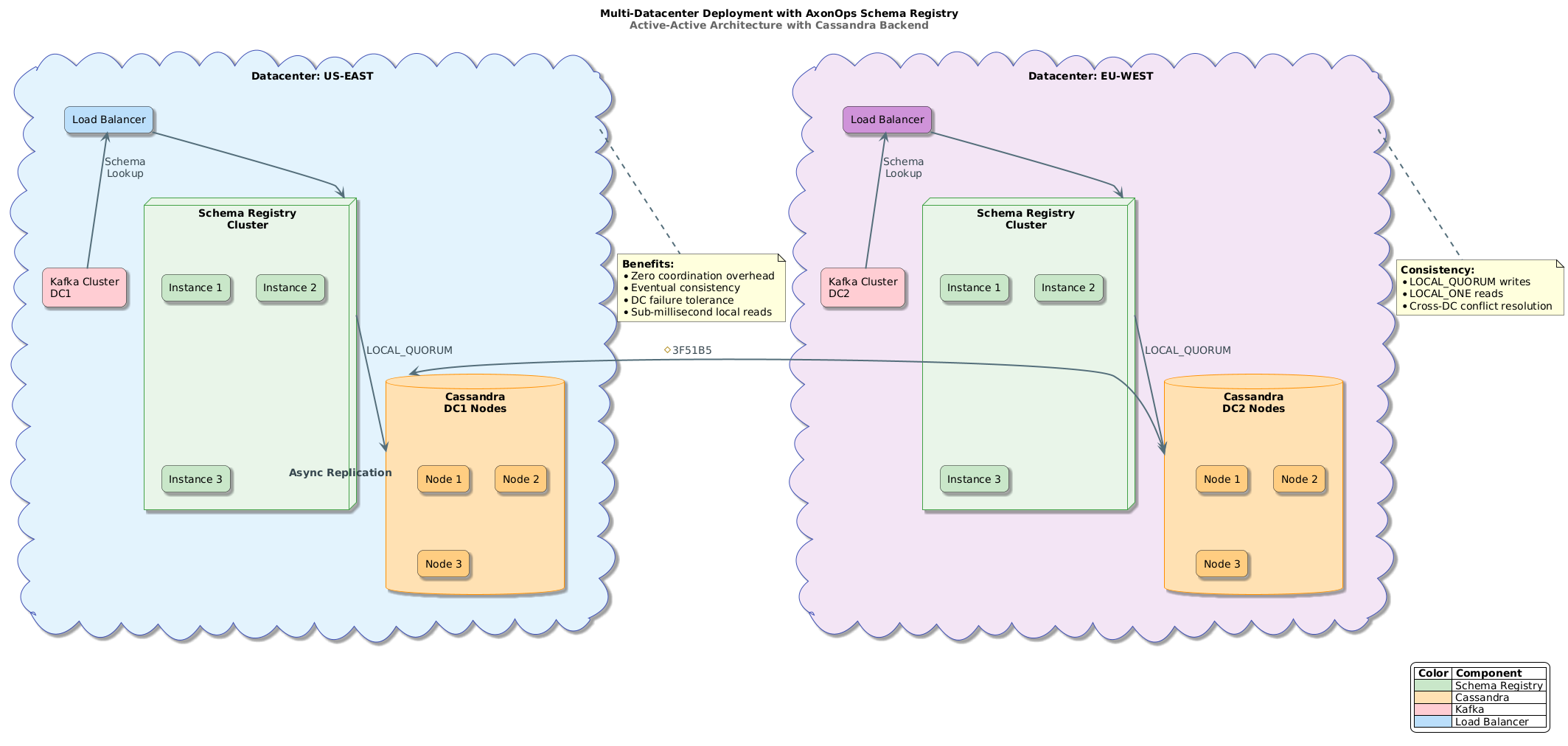
Active-Active deployment across three datacenters
With Cassandra as the backend:
- Zero Coordination Overhead: Each registry instance is stateless
- LOCAL_QUORUM Writes: Strong consistency within each DC
- Automatic Cross-DC Replication: Cassandra handles it natively
- Datacenter Failure Tolerance: Other DCs continue operating
storage:
 type: cassandra
 cassandra:
   hosts:
     - "cass-dc1-1.example.com"
     - "cass-dc1-2.example.com"
   keyspace: "schema_registry"
   consistency: "LOCAL_QUORUM"
   local_dc: "dc1"
Performance & Resource Efficiency
Memory Footprint Comparison
AxonOps Schema Registry:     ~50MB
Karapace:                   ~200MB
Apicurio:                   ~300MB
Confluent Schema Registry:  ~500MB+
Why So Lightweight?
- Go vs JVM: Native binary with minimal runtime
- No Kafka Client: No embedded consumers/producers
- Efficient Caching: LRU cache with configurable TTL
- Connection Pooling: Optimized database connections
Performance Optimizations
- Schema Deduplication: Same content = same ID (SHA-256 fingerprints)
- Canonical Forms: Normalized schemas for efficient comparison
- In-Memory Caching: Sub-millisecond lookups for hot schemas
- Connection Pooling: Configurable pool sizes and lifetimes
Migration: Seamless Transition from Confluent
Moving from Confluent Schema Registry? We’ve got you covered.
Schema Import API
AxonOps provides a dedicated import API that preserves schema IDs—critical because Kafka messages contain schema IDs in their wire format.
# Export from Confluent
./migrate-from-confluent.sh \
   --source http://confluent-sr:8081 \
   --target http://axonops-sr:8081 \
   --verify
The import API:
- Preserves original schema IDs
- Maintains subject-version mappings
- Ensures new schemas get IDs after imported ones
- Supports incremental migration
Migration Script
We provide a ready-to-use migration script:
./scripts/migrate-from-confluent.sh \
   --source http://confluent-sr:8081 \
   --source-user admin \
   --source-pass secret \
   --target http://axonops-sr:8081 \
   --target-apikey $API_KEY \
   --verify
Integration with AxonOps Platform
AxonOps Schema Registry is fully integrated with the AxonOps platform, providing:
- Unified Dashboard: Monitor schemas alongside Kafka clusters
- Alerting: Get notified on compatibility violations
- Capacity Planning: Track schema growth and storage usage
- Team Management: Centralized user and access control
Deployment Options
Binary Distribution
Download and run—no JVM, no Python, no containers required:
# Download binary directly
curl -LO https://github.com/axonops/axonops-schema-registry/releases/latest/download/schema-registry-linux-amd64
./schema-registry-linux-amd64 -config config.yaml
RPM (RHEL, CentOS, Fedora)
# Add AxonOps yum repository
sudo tee /etc/yum.repos.d/axonops.repo <<EOF
[axonops]
name=AxonOps Repository
baseurl=https://packages.axonops.com/yum/stable
enabled=1
gpgcheck=1
gpgkey=https://packages.axonops.com/gpg.key
EOF
# Install
sudo yum install axonops-schema-registryDEB (Ubuntu, Debian)
# Add AxonOps apt repository
curl -fsSL https://packages.axonops.com/gpg.key | sudo gpg --dearmor -o /usr/share/keyrings/axonops.gpg
echo "deb [signed-by=/usr/share/keyrings/axonops.gpg] https://packages.axonops.com/apt stable main" | sudo tee /etc/apt/sources.list.d/axonops.list
# Install
sudo apt update && sudo apt install axonops-schema-registryDocker
docker run -d \
 -p 8081:8081 \
 -v $(pwd)/config.yaml:/etc/schema-registry/config.yaml \
 axonops/schema-registry:latest
Kubernetes (Helm)
helm repo add axonops https://charts.axonops.com
helm install schema-registry axonops/schema-registry \
 --set storage.type=postgresql \
 --set storage.postgresql.host=postgres.default.svc
Licensing & Support
Open Source (Apache 2.0)
AxonOps Schema Registry is fully open source under the Apache 2.0 license. You get:
- All features included (no “enterprise tier”)
- Freedom to modify and distribute
- Community support via GitHub
Commercial Support
For organizations requiring production support, AxonOps offers:
- 24/7 Support: Direct access to engineering team
- SLA Guarantees: Response time commitments
- Professional Services: Migration assistance, architecture review
- Training: Team enablement and best practices
Contact [email protected] for enterprise support options.
Getting Started
Quick Start (Memory Backend)
# config.yaml
server:
 host: "0.0.0.0"
 port: 8081

storage:
 type: memory

compatibility:
 default_level: BACKWARD
./schema-registry -config config.yaml
Production Setup (PostgreSQL)
# config.yaml
server:
 host: "0.0.0.0"
 port: 8081

storage:
 type: postgres
 postgres:
   host: "postgres.example.com"
   port: 5432
   username: "${DB_USER}"
   password: "${DB_PASS}"
   database: "schema_registry"
   ssl_mode: "require"

auth:
 basic:
   enabled: true
   bootstrap_user: "admin"
   bootstrap_password: "${ADMIN_PASS}"
 rbac:
   enabled: true
   default_role: "readonly"

security:
 tls:
   enabled: true
   cert_file: "/etc/ssl/server.crt"
   key_file: "/etc/ssl/server.key"

compatibility:
 default_level: BACKWARD
Conclusion
Choosing a schema registry is a long-term decision. Here’s our recommendation:
| If You Need... | Recommended Solution |
|---|---|
| Maximum compatibility, enterprise budget | Confluent Enterprise |
| Open source, already have Kafka infrastructure | Karapace |
| Multi-protocol API registry | Apicurio |
| Lightweight, secure, multi-DC, no Kafka dependency | AxonOps Schema Registry |
AxonOps Schema Registry represents a new generation of schema management—built for modern cloud-native deployments, with enterprise security included from day one, and without the operational overhead of Kafka-based storage.
Ready to try it? Check out our GitHub repository or contact us for a demo.
Resources
- GitHub: github.com/axonops/axonops-schema-registry
- Documentation: axonops.com/docs/schema-registry
- Migration Guide: axonops.com/docs/schema-registry/migration
- Support: [email protected]
AxonOps Schema Registry is developed by AxonOps Limited. Apache Kafka is a trademark of the Apache Software Foundation. Confluent is a trademark of Confluent, Inc.