
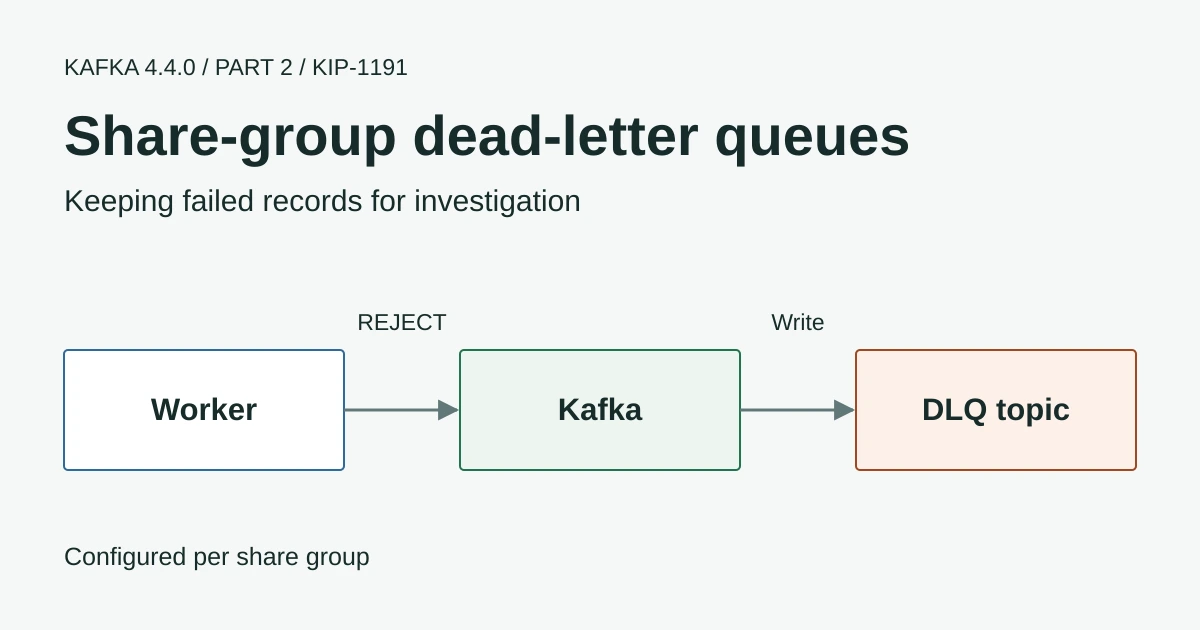
Andrew Schofield’s work on Kafka share groups made it possible for workers to acknowledge individual records without owning a partition exclusively. The next question was what to do with a record that none of those workers could process. Kafka 4.4.0 adds broker-managed dead-letter queues through KIP-1191 so those failures can be sent to another topic for investigation.
That fills an important gap in the Kafka 4.2 behaviour covered in our KIP-932 share-group article. Rejecting a record ended delivery to that group but didn’t automatically create a separate copy for someone to inspect later. The new support gives you that option without making every worker implement its own DLQ producer.
This is Part 2 of our Kafka 4.4.0 series. Let’s follow the transaction-notification example from the earlier article and see what changes when a worker cannot send a notification.
Failed Notifications
A temporary provider outage and a malformed notification need different handling. If a provider is briefly unavailable the worker can release the record so another delivery attempt is possible. If the record has no usable recipient the worker may reject it because another attempt with the same data won’t help.
| Worker acknowledgement | Broker behaviour |
|---|---|
ACCEPT | Completes delivery of that record for the share group |
RELEASE | Makes the record available for another attempt while the delivery limit allows it |
REJECT | Ends normal delivery and makes the record eligible for the configured DLQ |
| Repeated failed deliveries reach the limit | Ends normal delivery and makes the record eligible for the configured DLQ |
RELEASE is not a request to wait a particular number of seconds. A worker needs an appropriate retry policy for the external service so an outage doesn’t cause records to race through their delivery attempts. Kafka also cannot make a notification provider’s send and the acknowledgement one atomic operation. Keep a stable notification identity and handle duplicates safely.
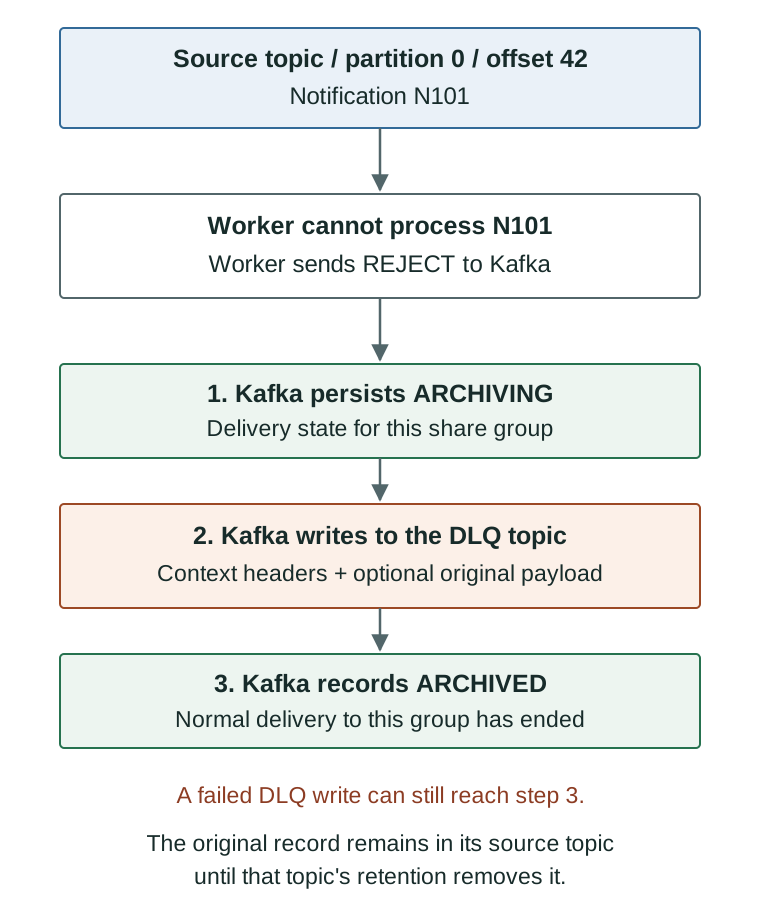
The record isn’t moved out of its source partition. Other groups can still read that topic independently and its retention policy still applies. ARCHIVED describes the delivery state for this share group rather than a backup of the payload.
Enable the DLQ
The feature requires share.version=2 and compatible brokers. The 4.4.0 feature definition marks this as the production share version for the release. An existing cluster still needs its configured feature level checked after the rolling upgrade.
The example below assumes that feature upgrade is complete and at least three brokers are available. It uses a pre-created DLQ with a seven-day retention period chosen for illustration. Use your own security configuration in admin.properties and choose retention according to your investigation and data-handling requirements.
bin/kafka-topics.sh --bootstrap-server kafka-1:9092 \
  --command-config admin.properties --create \
  --topic dlq.transaction-notifications \
  --partitions 3 --replication-factor 3 \
  --config min.insync.replicas=2 \
  --config retention.ms=604800000 \
  --config errors.deadletterqueue.group.enable=true
The final setting belongs to the destination topic. It permits that topic to receive share-group DLQ records and is separate from choosing the topic for a group. This check prevents an arbitrary business topic from being used as a DLQ just because someone names it in group configuration.
Now configure the share group. This example enables copying the original record so the investigation doesn’t depend on retrieving it later from the source topic.
bin/kafka-configs.sh --bootstrap-server kafka-1:9092 \
  --command-config admin.properties --alter \
  --entity-type groups --entity-name transaction-notifications \
--add-config 'errors.deadletterqueue.topic.name=dlq.transaction-notifications,errors.deadletterqueue.copy.record.enable=true'| Setting | Scope | Default |
|---|---|---|
errors.deadletterqueue.topic.name | Share group | Empty so no DLQ is configured |
errors.deadletterqueue.copy.record.enable | Share group | false so the DLQ contains context without the original payload |
errors.deadletterqueue.group.enable | Destination topic | false |
errors.deadletterqueue.auto.create.topics.enable | Broker | false |
errors.deadletterqueue.topic.name.prefix | Broker | dlq. |
These scopes are checked against the released group configuration and topic configuration. Kafka’s DLQ system tests exercise both payload copying and headers-only records. The commands here are a source-checked example rather than a report of an AxonOps deployment test.
What the DLQ Contains
Kafka adds context headers identifying the original topic and partition together with the offset and share-group ID. It can also include the delivery count and a broker-side failure message. For our example the identifying headers would include the following values.
__dlq.errors.topic: transaction-notifications
__dlq.errors.partition: 0
__dlq.errors.offset: 42
__dlq.errors.group: transaction-notifications
With payload copying enabled the investigator also has the failed notification data. Without it the headers can identify the source record but that record may already have expired by the time someone investigates. Treat DLQ access and retention as part of the same security review as the source topic because copied records may contain customer information.
DLQ Write Failures
A DLQ is not guaranteed preservation
Kafka can archive the share-group record after a DLQ write fails. Duplicates are also possible because the DLQ write and delivery-state update are separate operations. Monitor the DLQ failures and keep replay processing idempotent.
The released implementation persists an ARCHIVING state before attempting the DLQ operation. It then progresses to ARCHIVED and logs an error if that operation failed. Persisted ARCHIVING records can resume the flow after a broker restart but this doesn’t make the two writes an exactly-once transaction.
For a notification service I’d test rejection and repeated release alongside a missing DLQ topic and a broker interruption. I’d also check that the investigation process can distinguish a duplicate DLQ entry from a different failed notification before allowing anyone to replay records.
Investigating and Replaying Records
A DLQ consumer can inspect failures using normal Kafka consumption. It doesn’t have to be another share group. Once the underlying issue is fixed you still need an explicit replay process with a decision about whether the external action has already happened.
The AxonOps share-group protocol guide explains the fetching and acknowledgement APIs. Our Connect monitoring article covers connector error handling separately. Connect DLQs and share-group DLQs solve related problems but their configuration is not interchangeable.
Thanks to Andrew Schofield and the contributors who implemented and tested this extension. Having failed records available for inspection is a welcome addition to share groups provided the application also checks that those records actually reached the DLQ.
Continue with Part 3 on Kafka Streams state recovery or Part 4 on Connect internal topics.