
How do you know whether your Apache Kafka® cluster needs rebalancing when every broker holds roughly the same number of partitions? A busy topic can put much more load on its brokers than a quieter one so partition counts alone won’t tell you how evenly the work is distributed.
I’d look at disk usage and CPU and network load alongside request latency before deciding to move anything. If the cluster is meeting its performance requirements and has room for expected growth there may be little to gain from moving replicas just to make the charts look more even.
Rebalancing can help when some brokers are running short of capacity or when you’re adding or retiring brokers. Moving replicas copies data while applications are still using the cluster so the proposed moves need to account for that extra disk and network traffic.
Broker and Consumer Rebalancing
Broker rebalancing changes the placement of partition replicas and their preferred leaders while consumer-group rebalancing changes which application instance reads each partition.
| Operation | What changes | What it addresses |
|---|---|---|
| Broker and partition replica rebalancing | Replicas move between brokers or the preferred leader changes | Uneven broker load and replica placement when adding or retiring brokers |
| Consumer-group rebalancing | Partitions are assigned to application consumers without moving stored replicas | Consumers joining or leaving the group and changes to subscribed partitions |
If your consumers keep rejoining their group or stop making progress during deployments the consumer rebalancing guide covers that separate investigation.
Why Kafka Clusters Need Balancing
Kafka splits each topic into partitions and stores copies of those partitions on brokers. These copies are called replicas and one replica leads each partition. A broker usually holds replicas from many topics so its workload depends on which partitions it stores and which ones it leads.
Even an evenly distributed partition count can hide differences in disk usage and traffic because a busy orders topic might produce much more data than a reference-data topic. Balancing becomes useful when your cluster changes in a few familiar ways.
- Traffic grows unevenly and some brokers need more disk space or handle more requests while others still have capacity available.
- You add brokers and want existing workloads to use them. Adding a broker alone does not redistribute existing partition replicas.
- You retire a broker and need to move its replicas elsewhere before taking it out of service.
The aim is to leave enough capacity for the workload to grow while keeping replicas in the right failure domains. Equal partition counts alone cannot tell you whether you’ve achieved that. Our Kafka scaling guide explains how adding brokers and redistributing replicas work together.
How Kafka Moves a Replica
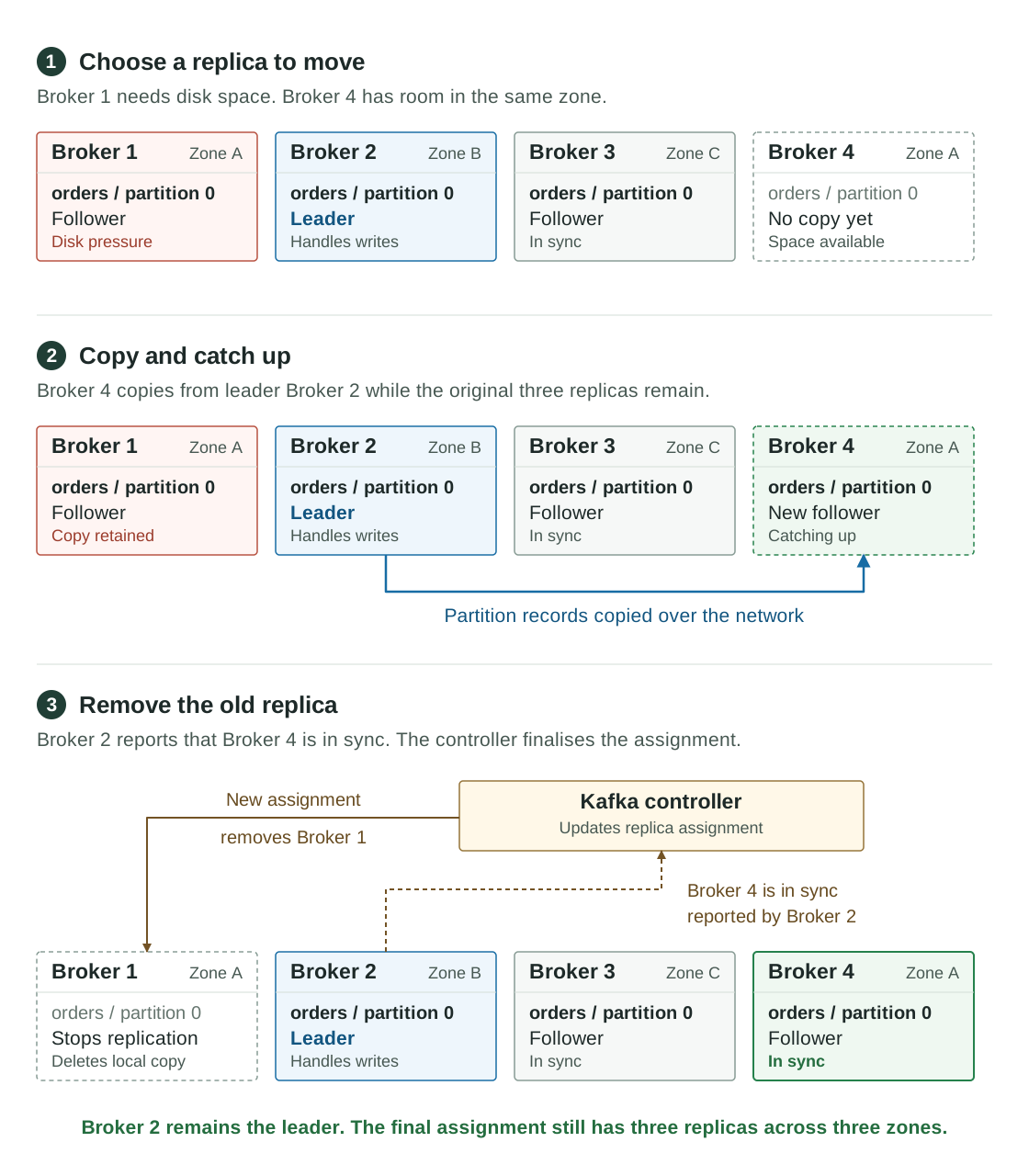
Suppose partition 0 of an orders topic has three replicas on brokers 1, 2 and 3. Broker 1 is short of disk space while Broker 4 has room in the same availability zone. Broker 2 is the partition leader and will remain the leader throughout this example.
Kafka adds Broker 4 to the assignment so it can fetch the partition’s records from Broker 2. The original replicas remain available while the new copy catches up with ongoing writes. Broker 2 reports the updated in-sync replica set to the Kafka controller once Broker 4 has caught up. The controller finalises the assignment without Broker 1 and that metadata change tells Broker 1 to stop replicating the partition and delete its local copy. In KRaft the assignment change reaches the brokers through the metadata log.
Copying those records uses disk and network capacity while the cluster continues serving applications. AxonOps lets you limit concurrent movements so you can control how much copying is in progress. The partition reassignment guide describes Kafka’s copying and catch-up process.
Leadership can also move to an existing in-sync replica to redistribute request handling without copying the whole partition again. Neither operation splits a partition or changes its records.
AxonOps and Cruise Control
If you’ve looked into Kafka rebalancing you’ll probably have come across Cruise Control. Originally developed at LinkedIn it established a goal-based approach that has helped teams operate large Kafka deployments. AxonOps uses the same general approach with familiar goal names through a separate implementation. It doesn’t run Cruise Control underneath.
AxonOps Kafka Adaptive Balancer uses the metrics already collected by AxonOps to propose replica movements and leadership changes. You can review those proposals and execute them from the same interface you use to investigate broker load across the Kafka clusters in your AxonOps organisation.
Let’s look at how the two fit into a Kafka environment before following a rebalance in AxonOps. The comparison covers the upstream Cruise Control service and LinkedIn’s separate Cruise Control UI as checked on 19 October 2026. Commercial products and other frontends built around Cruise Control can have different capabilities.
One Balancer Across Your Kafka Clusters
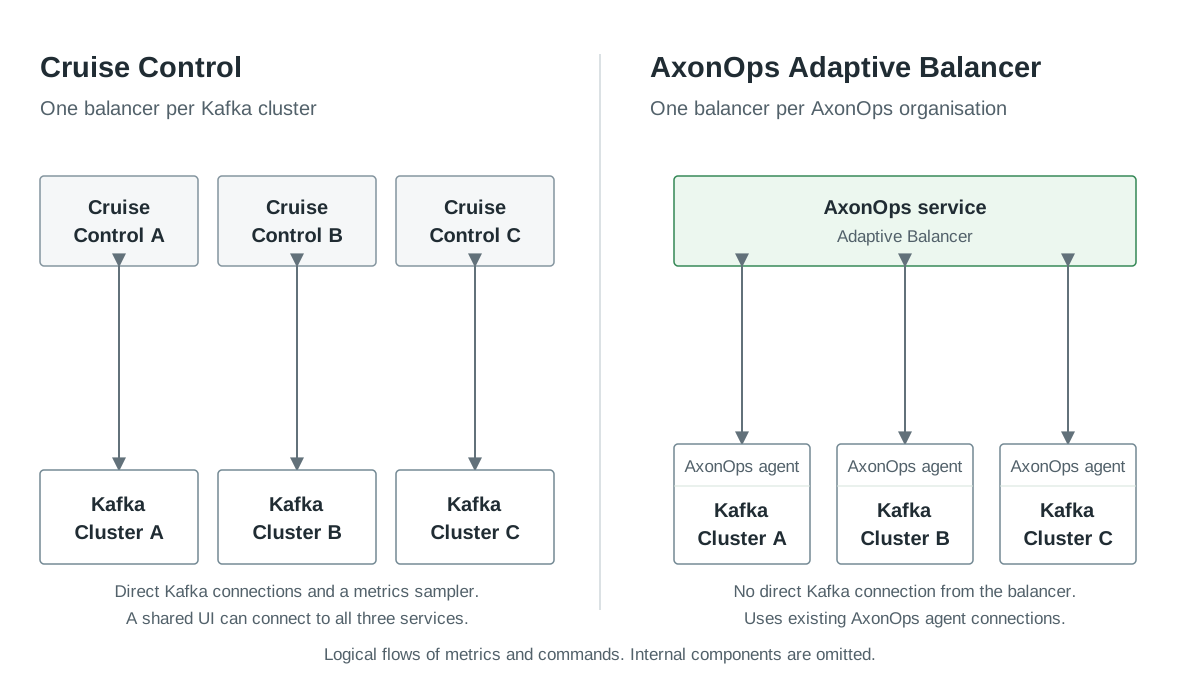
Suppose you have separate Kafka clusters for development and staging alongside four production clusters. With Cruise Control you run a separate service instance for each of those six clusters. A maintainer confirms this deployment model in the project’s multi-cluster discussion.
That doesn’t mean buying six servers because the instances can run in separate containers on shared infrastructure. You do still have six service configurations to maintain and six sets of cluster connections to check when credentials or network rules change. A shared Cruise Control UI can present those instances together but doesn’t replace the separate backend services.
AxonOps manages balancing across the Kafka clusters in your organisation through one service. Each cluster has its own enabled goals and analysis history so you can apply different balancing requirements to development and production without managing a separate balancing application for each cluster.
Kafka and Metrics Connections
Cruise Control connects directly to the Kafka cluster it manages. Its default metrics setup adds CruiseControlMetricsReporter to the brokers and sends measurements to a Kafka topic for Cruise Control to consume. The upstream setup instructions cover the reporter and cluster connection settings.
There is also a Prometheus metric sampler if you want to use Prometheus as the source. Choosing that option means giving Cruise Control access to the Prometheus endpoint as well as Kafka.
The AxonOps service uses the topology and metrics already collected by the AxonOps agents to plan rebalancing. When you execute a plan the service sends the requests through those agents to Kafka. There is no additional broker metrics reporter to install or direct Kafka connection to configure for the balancer. The AxonOps agents use their existing Kafka connections to carry out the changes.
| Connection | Cruise Control | AxonOps Adaptive Balancer |
|---|---|---|
| Balancer to Kafka | Direct connection to each managed cluster from its Cruise Control instance | The AxonOps service sends commands through the existing AxonOps agents |
| Metrics source | Reporter topic by default or a configured alternative such as Prometheus | Metrics already collected by AxonOps agents |
| Dashboard | Separate UI or another integration calling Cruise Control’s API | Adaptive Balancing pages within AxonOps |
| Multi-cluster management | A separate Cruise Control instance per Kafka cluster | One AxonOps service manages balancing across registered clusters |
For a team already running AxonOps this avoids setting up another metrics collection path and another service with broker credentials for each cluster.
Enterprise Access and Audit Records
Who should be able to move production data? How do you remove that permission when someone changes teams? Where will you find the record of a rebalance when reviewing a change?
The Adaptive Balancing pages require the Admin or SuperUser role through AxonOps’ existing platform access model so you manage access alongside the permissions your team already uses for Kafka operations.
AxonOps audits changes with a record of who did what and when. When reviewing a production rebalance you can identify the person who made a change and the time it happened alongside the work recorded by the balancer.
The Analyses and Executions pages retain the proposals and movement results so you can review what the balancer attempted and which movements completed. Their retention follows the configured AxonOps events retention period. Keep that period aligned with how long your team needs to review operational changes.
Cruise Control also has enterprise-relevant controls. Its security configuration supports authentication providers and the VIEWER, USER and ADMIN roles. It supports JWT integration and trusted proxies as well as HTTP Basic authentication. HTTP access logging and optional two-step verification for changes are available too.
The work with Cruise Control is configuring those controls across your service instances and integrating their records with your wider operations process. With AxonOps you manage balancing alongside the platform’s monitoring and user access controls with changes recorded in its audit trail. Our Kafka enterprise compliance article covers the wider access reviews and security audit records available in AxonOps.
Teams that require separate change approval should complete that review before selecting live execution because AxonOps’ current balancer workflow has no separate approver step.
Cruise Control UI Maintenance
The LinkedIn Cruise Control UI is a separate project from the balancing service. Its public repository gives a reason to check the frontend carefully before depending on it for production operations.
| LinkedIn Cruise Control UI | Repository evidence on 19 October 2026 |
|---|---|
| Latest published release | v0.4.0 on 27 May 2022 |
| Latest default-branch commit | 20 August 2024 |
| Outstanding contributions | Dependency and UI updates and additional API and disk information remained open |
There are people contributing improvements but those open pull requests haven’t become an upstream release. If you choose that frontend you need to test its compatibility with your Cruise Control version and decide whether you’ll maintain a fork or use another interface. Check other frontends separately because these observations are specific to LinkedIn’s UI repository.
AxonOps includes the balancing interface in the product so the proposal view and execution tracking are part of the same supported application as your Kafka monitoring. You don’t have to assemble and maintain a separate frontend integration to use them.
Cruise Control Core Development
The core project has continued receiving maintenance while the UI has gone without a release. Cruise Control 3.1.0 was released on 16 October 2026 as the first release under the Linux Foundation. It added Kafka 4.3.1 support alongside webserver security fixes and dependency updates. Recent merged work has focused on compatibility and maintenance.
Open pull requests propose new capabilities including disk I/O balancing within brokers and more detailed movement progress and stuck-movement alerts. These contributions were still under review and had not reached a release at the time of writing.
The evidence supports an actively maintained core with a much quieter upstream UI. The comparison with AxonOps is about the services and integrations your team needs to operate across its Kafka clusters. It doesn’t depend on dismissing the work of the Cruise Control community.
Rebalancing a Cluster in AxonOps
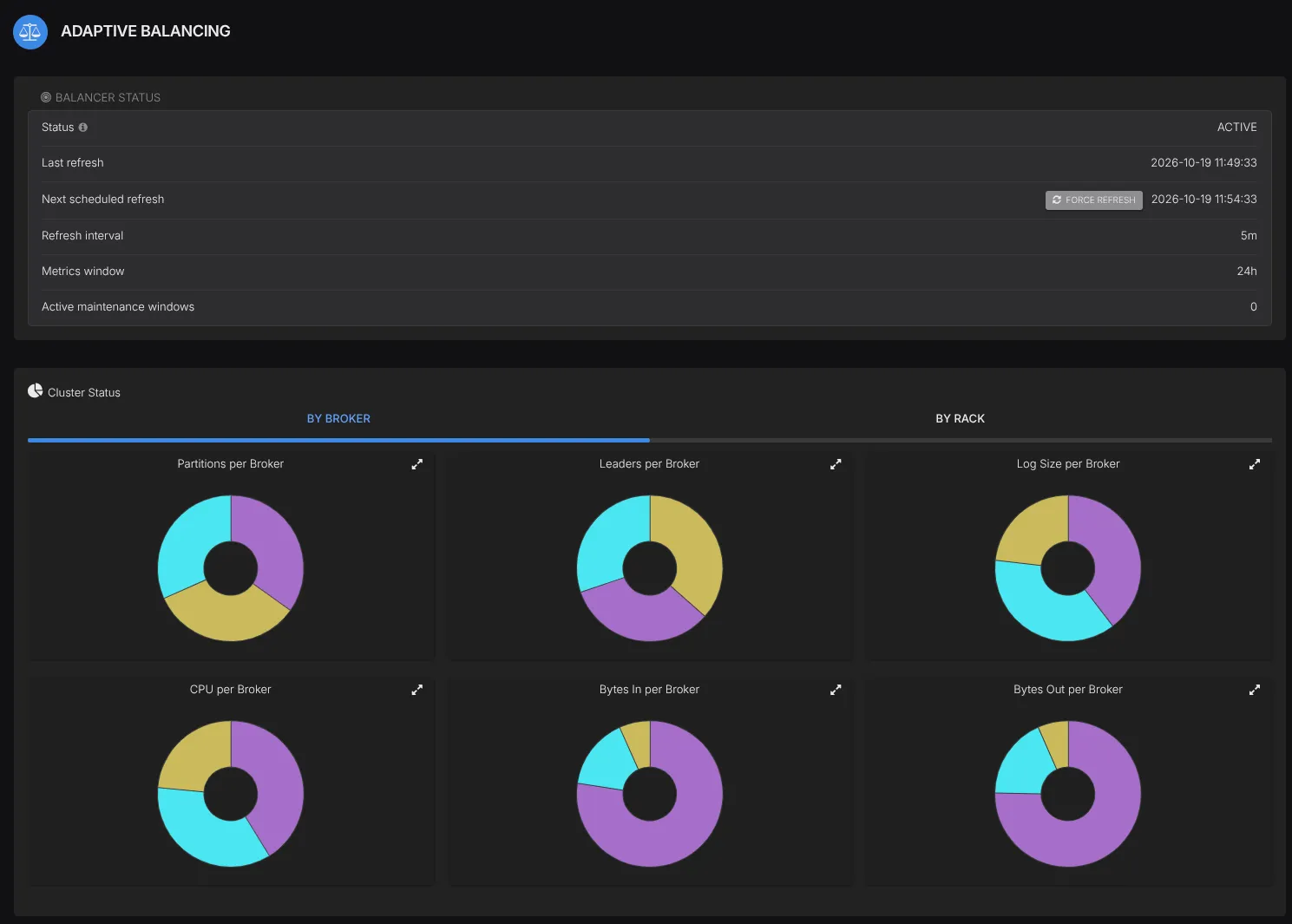
Open Adaptive Balancing to compare how partitions and leaders are distributed alongside disk usage and CPU and network load. You can check whether one broker is carrying more of the workload before asking the balancer for a proposal.
In the four-broker example above the replica moves between brokers in Zone A so the final placement still has one replica in each zone. Broker 2 couldn’t be the destination because it already holds a copy of that partition. Other proposed moves also need to respect the cluster’s rack placement and capacity limits.
Balancing goals let us describe those requirements without choosing every destination ourselves. Hard goals check constraints such as rack placement and resource capacity while soft goals seek a more even distribution within those constraints. AxonOps runs the enabled goals in a fixed order and checks proposed moves against goals that have already run.
| Goal | What it checks |
|---|---|
RackAwareGoal | Each replica of a partition has a different rack |
DiskCapacityGoal | A broker stays below its configured disk capacity threshold |
CpuCapacityGoal | A broker stays below its configured CPU threshold |
ReplicaDistributionGoal | Replica counts are distributed more evenly |
DiskUsageDistributionGoal | Disk utilisation is closer to the cluster mean |
DrainGoal | Replicas move off brokers marked for draining |
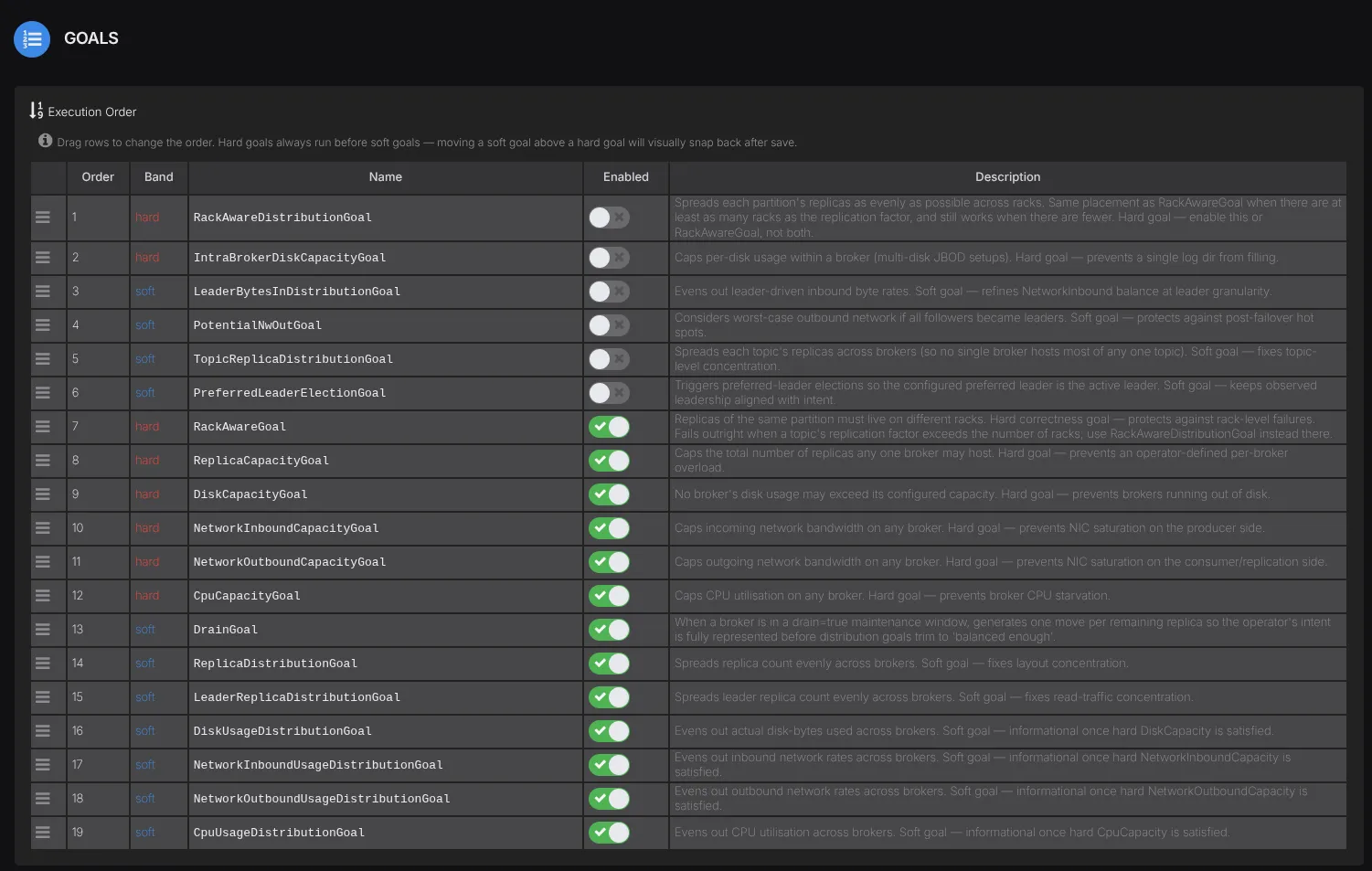
Set broker.rack to the intended failure domain before relying on rack-aware proposals. Without it the balancer treats separate hosts as separate racks and cannot infer that two hosts share an availability zone. The goal and cluster-model reference explains the thresholds and the alternative rack distribution goal for clusters with fewer racks than their largest replication factor. Our Kafka multi-AZ guide covers the failure scenarios behind those settings.
The four-broker example is illustrative and the actual proposal depends on the complete cluster model and enabled goals.
Review and Execute
The analysis summary shows how many movements are proposed and how much data would move before you select a dry run or live execution. Check any remaining goal violations alongside the individual proposals before proceeding.
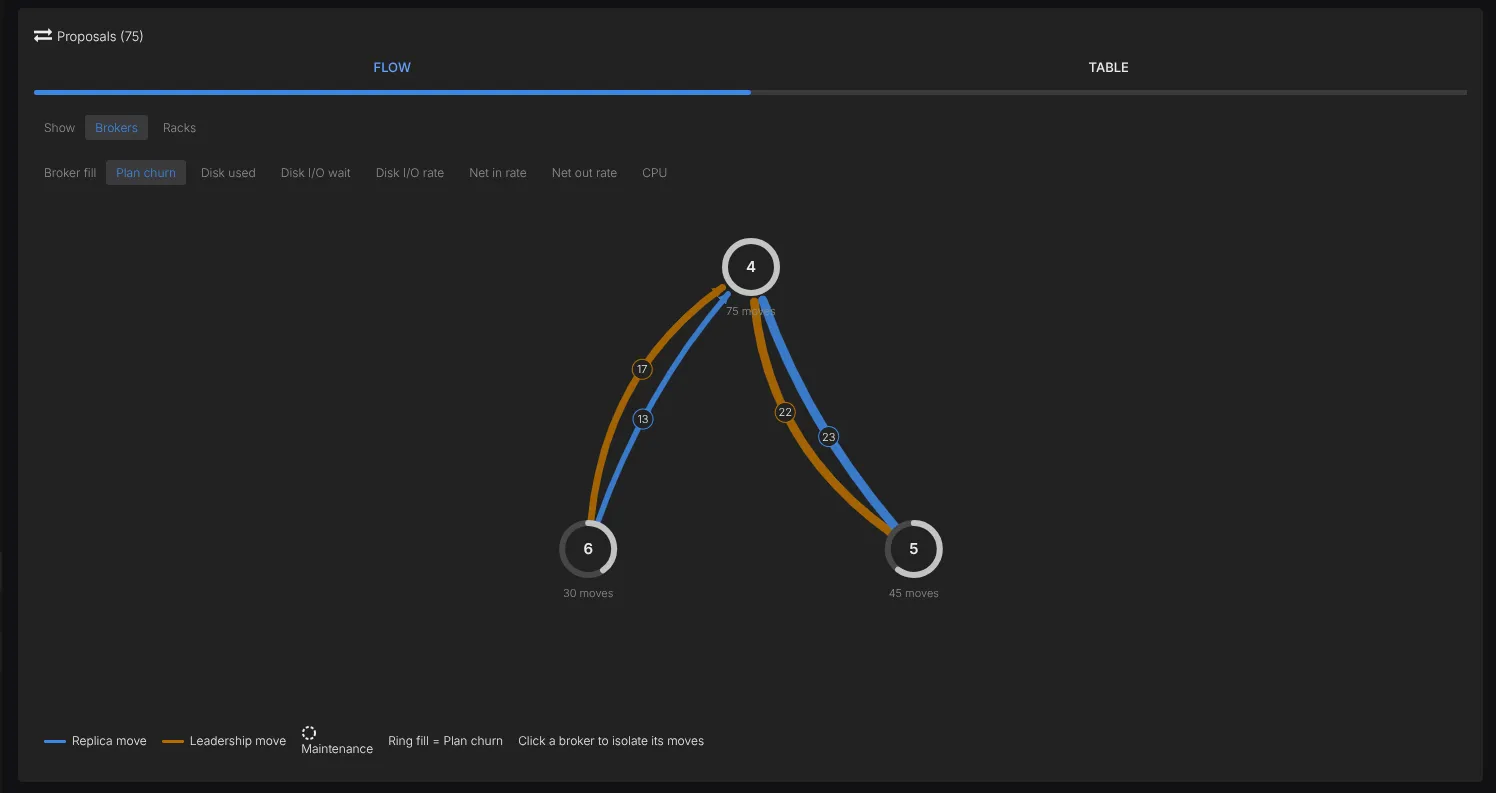
The proposal view at the top of this article shows planned replica moves in blue and leadership changes in orange between three brokers. You can follow where each move goes before deciding whether to execute the plan.
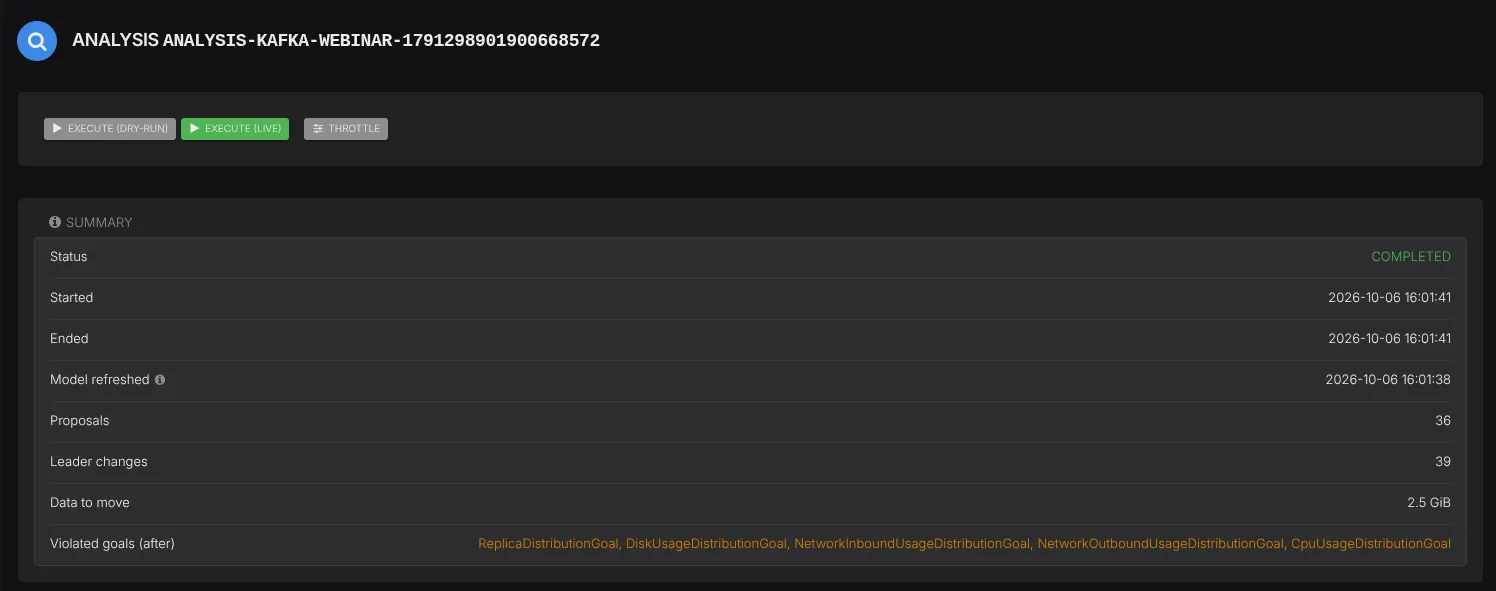
- Open Adaptive Balancing and check the model’s refresh time and broker load. Confirm that the required metrics are present before asking the balancer to plan a move because missing measurements are treated as zero load.
- Start a new analysis from Analyses and inspect its proposals. Use the movement table to check each topic and partition against its source and target brokers. The Rejection Summary explains which goals prevented other moves.
- Run Execute (dry-run) to validate the execution plan without submitting changes to Kafka. A successful dry run doesn’t measure the load that copying data will create.
- Generate a fresh analysis immediately before live execution and confirm that no other execution is running for the cluster. Review the movement limits and select Execute (live) only when you’re ready for reassignments to start.
- Follow the execution and compare broker behaviour with the period before the move. Confirm that every proposal completed and that the failed count is zero before checking the actual replica placement and leaders.
The rebalancing guide covers these checks and broker maintenance windows. It also explains why a completed preferred-leader change still needs Kafka’s preferred leader election before actual leadership moves.
Execution Controls to Compare
Both products can analyse a cluster without moving data. Their execution controls differ in ways you should check against your operating requirements.
| Requirement | AxonOps Adaptive Balancer | Cruise Control |
|---|---|---|
| Operator-reviewed execution | Separate analysis and live execution | Proposals and dry-run requests before execution |
| Automatically execute a rebalance after an anomaly | No. Anomalies can trigger analysis but live execution remains an operator action | Configurable self-healing |
| Limit movement concurrency | Cluster-wide and per-broker limits | Configurable movement concurrency |
| Set Kafka replication bandwidth throttles | No Kafka bandwidth throttle. The data limit controls bytes in flight | Supports replication_throttle |
| Move replicas between disks within one broker | Not supported by the current executor | Supports intra-broker disk rebalancing |
Cruise Control’s rebalance API and self-healing configuration document its side of this comparison. With AxonOps you can limit how much data movement is in progress without setting a cap on the rate at which Kafka copies each replica.
After a rebalance allow the configured metrics window to reflect the new placement before running another load-based analysis. The default is one hour because the model averages rates over that window. Use the Kafka monitoring metrics to check request latency and replication alongside disk and network load during the move.
Start Rebalancing with AxonOps
For teams already monitoring Kafka with AxonOps the Adaptive Balancer adds proposal review and execution without another per-cluster balancing application. The AxonOps agents supply the metrics and carry out Kafka requests while your team works through the same dashboard and platform access controls.
The feature needs to be enabled for your organisation. Contact us to enable Adaptive Balancing for your Kafka clusters and use the rebalancing guide to review your first proposal.