
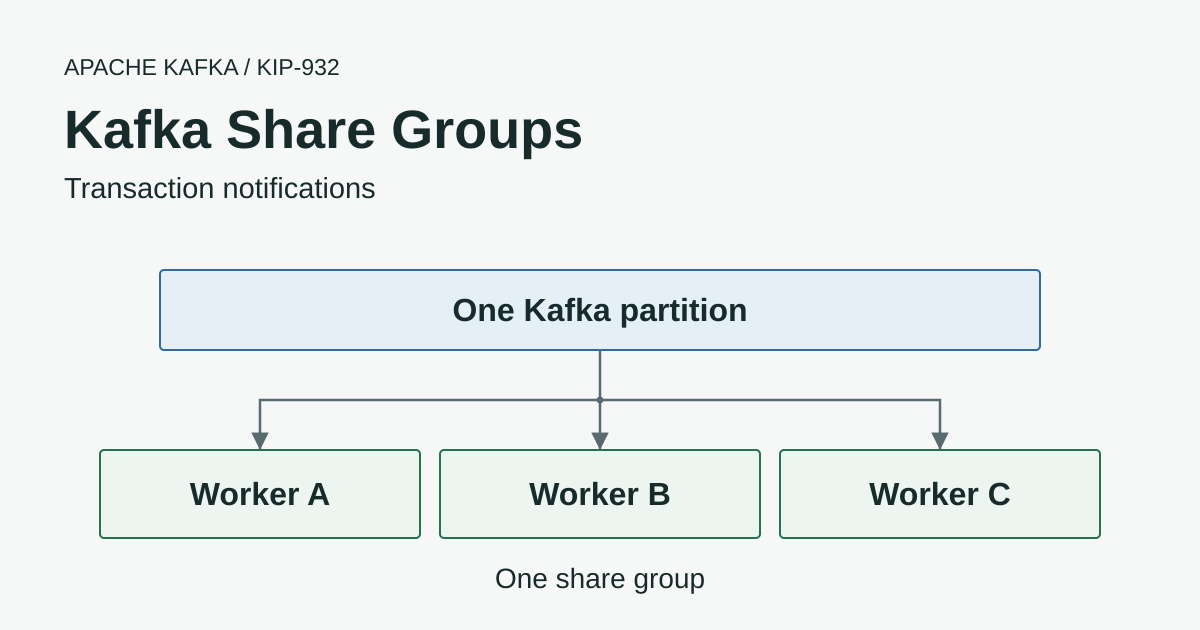
Andrew Schofield proposed KIP-932 Queues for Kafka to bring queue-style processing to Kafka and that work progressed from early access in Kafka 4.0 through preview in 4.1 to production-ready share groups in Kafka 4.2. We’re grateful to Andrew and everyone who implemented and reviewed the changes and tested them across those releases.
Kafka share groups let several workers fetch different records from the same partition while Kafka tracks acknowledgements and retries for each record. A conventional consumer group assigns each partition to one consumer at a time so adding consumers beyond the partition count leaves the extra members without a partition to read.
We’re excited to have this in Kafka because it gives teams a way to scale independent job processing on their existing clusters without requiring a partition for every worker. The appeal of “queues for Kafka” is that individual acknowledgements and redelivery are now handled by Kafka instead of requiring applications to build that tracking around consumer-group offset commits.
Applications that need strict processing order still have to account for workers finishing jobs out of order so we’ll look at where each group type fits through two banking examples.
Consumer Group and Share Group Use Cases
We’ll use two banking examples to look at when processing needs to stay in order and when workers can finish jobs independently.
- Scheduled payments need incoming credits to be applied first so the outgoing payments that depend on those funds can go ahead.
- Transaction notifications can run independently because sending one customer a push notification doesn’t need to wait for another customer’s notification to finish.
Consumer groups and share groups both distribute records from a Kafka topic across application instances and allow independent groups to read the same retained data. Choosing between them depends on whether processing must follow partition order and whether Kafka needs to track acknowledgements and retries for each record.
Scheduled Payments
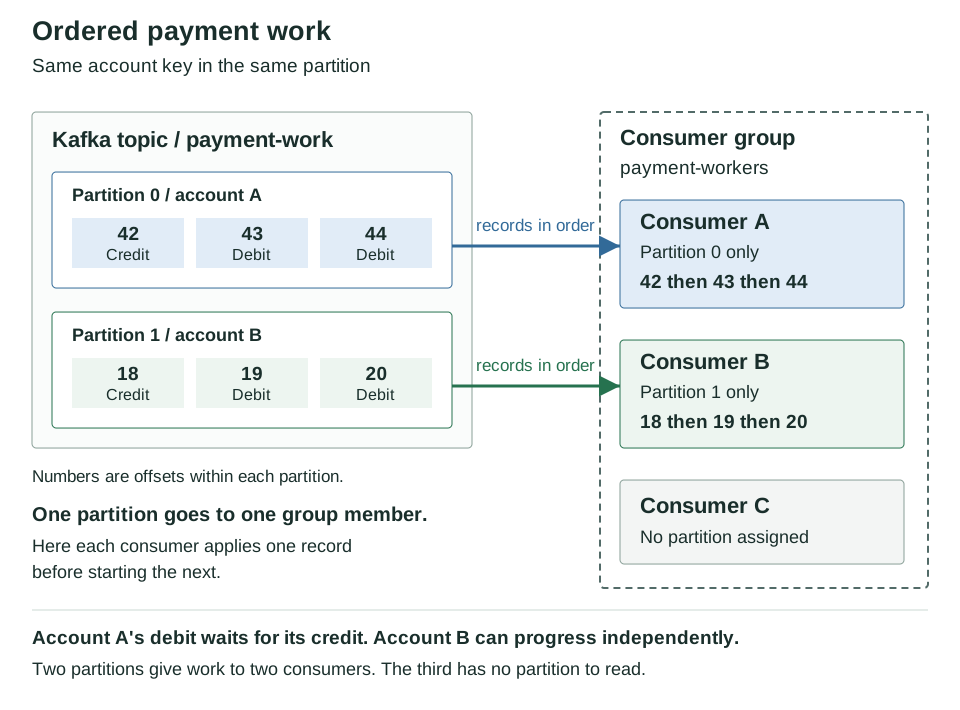
If a scheduled payment depends on an incoming salary credit then that credit has to be applied to the account before the payment can go ahead. A published banking implementation describes how to preserve this order for each account while allowing work on other accounts to continue.
The diagram shows the payment-workers consumer group reading a payment-work topic with Account A’s credit followed by its scheduled debits in partition 0 and Account B’s records in partition 1.
Consumer A receives partition 0’s records in offset order and processes 42 then 43 then 44 so the debit waits until the credit has been applied successfully and a retry of the credit delays that debit. Consumer B can process the other account’s records independently while Consumer C has no partition to read because the topic has only two partitions.
The published library can process different account keys concurrently while preserving the sequence for each account and uses a partition-level distributed lock to prevent old and new consumer generations from processing the same partition at the same time during a rebalance. The application still has to preserve processing order when handing records to a worker pool because Kafka’s partition ordering alone doesn’t ensure that those workers finish sequentially.
The ledger remains the source of truth for money movements with balances calculated from its entries while Kafka distributes the payment work and the application preserves the required processing order.
Transaction Notifications
Once a card payment has been recorded the bank can send a push notification without applying another debit to the account. If one customer’s notification takes longer to send the workers should still be able to send notifications to other customers while it waits.
The application saves the transaction and a notification job together using the outbox pattern so a temporary Kafka outage doesn’t lose the request to notify the customer. A publisher then reads the saved jobs and writes them to transaction-notifications using the same notification ID whenever publication has to be retried.
The diagram follows three push notifications for different customers with N101 to N103 as notification IDs and 42 to 44 as their Kafka offsets within one partition. All three records use the same message type and each contains the recipient and transaction details needed to send one notification.
- Three workers fetch from the same partition as members of the
notification-workersshare group and each acquires a different notification without needing a partition of its own. - Workers B and C send
ACCEPTafter the provider accepts N102 and N103 while Worker A sendsRELEASEbecause its request for N101 failed before acceptance. - The failed notification becomes available again once Kafka accepts the workers’ acknowledgements so an eligible worker can fetch N101 at the same offset and try the send again. N102 and N103 remain acknowledged for this group while N101 can be retried within the delivery limit and topic retention.
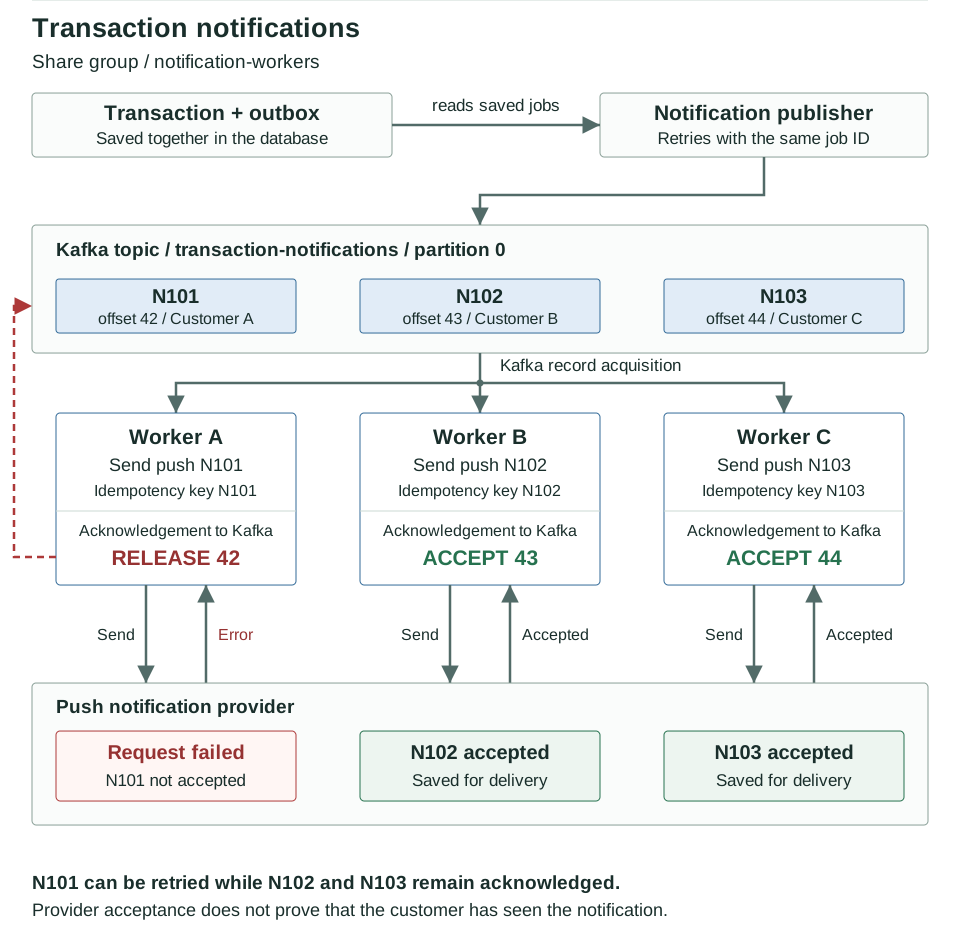
These workers can use a share group because each notification can finish independently while Kafka tracks acknowledgements and retries for each record. A consumer group could also run concurrent sends with an application worker pool but the application would need to manage completion tracking and retries itself. Notifications that must arrive in transaction order need additional sequencing before this design would be suitable.
An acceptance response tells the worker that the provider has accepted the send without proving that the customer has received or read the notification. That response can also be lost after acceptance so another attempt must reuse the notification ID with provider-side idempotency or equivalent deduplication. A local sent flag alone cannot prevent duplicates if the worker crashes between sending the notification and saving the flag because a replacement worker has no way to know that the send already succeeded.
Share Groups vs Consumer Groups
| Behaviour | Consumer group | Share group |
|---|---|---|
| Partition assignment | Exclusive to one member at a time | A partition can be assigned to several members |
| More consumers than partitions | Extra members cannot own a partition of that topic | Extra members can acquire different records from the same partition |
| Progress tracking | Committed offset per partition | Broker-managed record states and acknowledgements |
| Processing order | Applications can preserve partition order with sequential processing | Concurrent workers and redelivery can complete records out of order |
| Failed work | Application manages retries and offset commits | A record can be released or become available again after its acquisition lock expires |
| Record retention | Controlled by the topic | Still controlled by the topic |
| Java client | KafkaConsumer | KafkaShareConsumer |
Changing group.id or switching to the newer consumer-group rebalance protocol doesn’t turn an existing consumer into a share consumer because it still uses the consumer-group model of partition assignment and offset commits.
Acknowledgements and Retries
When a share consumer fetches an available record the broker acquires it for that consumer under a time-limited lock which prevents another member of the same share group from acquiring the record while the lock remains valid.
The application reports what happened to each record by choosing one of the following actions when using explicit acknowledgement mode.
| Action | Effect for this share group |
|---|---|
ACCEPT | Mark processing as complete so the record is no longer eligible for ordinary delivery in this group |
RELEASE | Make the record eligible for another delivery attempt subject to the delivery limit |
REJECT | Stop further delivery attempts for this record in the group |
RENEW | Extend the current acquisition lock for work that is still running. Added in Kafka 4.2 by KIP-1222 |
Calling acknowledge() updates the Java client’s pending acknowledgement state and the decision reaches Kafka through a subsequent poll or acknowledgement commit. Your application therefore needs to check whether Kafka accepted the acknowledgement as well as whether the notification was sent successfully.
Worker Failure
Let’s follow the three records from the notification diagram through a worker failure using illustrative events rather than measured timings.
| Event | Record 42 | Record 43 | Record 44 |
|---|---|---|---|
| Workers fetch available work | Acquired by A | Acquired by B | Acquired by C |
| B and C finish and Kafka accepts their acknowledgements | A is still processing | Acknowledged | Acknowledged |
| A crashes and its lock expires | Available again if below the delivery limit | Acknowledged | Acknowledged |
| B fetches again | Acquired by B for another attempt | Not delivered again | Not delivered again |
B can fetch record 42 and try its notification again while the acknowledgements for 43 and 44 remain recorded in Kafka so those completed jobs don’t need to be repeated.
If A sent the notification before crashing but Kafka never received its acknowledgement then B may send the same notification when it acquires record 42. A slow worker can also continue running after its lock expires while another worker receives the record and starts another attempt.
A Kafka acquisition lock cannot cancel an HTTP request or roll back a database write in the worker so use an idempotent operation or durable deduplication keyed by the job ID to prevent retries from applying the same external change twice. Our at-least-once delivery guide covers the application-side handling needed when records can be delivered more than once.
Slow and Failed Jobs
Jobs that run longer than the acquisition lock can use RENEW provided the Java client keeps polling and sends renewals before the lock expires. The application still needs to handle acknowledgement failures and loss of ownership because a renewal request can fail as well.
Kafka 4.2 limits delivery attempts through the broker setting group.share.delivery.count.limit which defaults to five so an unprocessable record cannot keep being retried indefinitely. An unsuccessful attempt at that limit moves the record into the group’s archived state and stops it from becoming available again.
Kafka 4.2 does not create a dead-letter record
In Kafka 4.2 REJECT or an exhausted delivery limit moves the record into the share group's archived state without copying it to a dead-letter topic. Your application needs a separate failure-handling path to retain rejected jobs for investigation or replay.
If your application publishes failed work to a dead-letter topic it must confirm that write before rejecting the original record. Share acknowledgements aren’t part of the producer transaction in this model so a failure between those operations can still create duplicate dead-letter records and downstream handling needs an identity it can deduplicate.
Kafka 4.4.0 adds configurable broker-managed DLQs through KIP-1191. Our share-group dead-letter queue guide covers the feature upgrade and the configuration needed to preserve failed records.
Why This Is Called a Kafka Queue
So why are people calling this a Kafka queue when the records are still sitting in the same old topic? We’ve now got workers sharing the jobs and acknowledging each one separately so a failed job can be picked up again without repeating jobs that have already been acknowledged.
KIP-932 keeps records in ordinary Kafka topic partitions rather than creating a separate queue storage object so accepting a record in one share group leaves it in the log for other share groups or consumer groups to read independently.
The topic’s retention policy still applies to records that a share group hasn’t finished processing so Kafka can remove them before a worker completes the job. Set retention to cover the longest outage and recovery time you need to support because acknowledgements don’t keep records on disk until every job succeeds.
Keeping an account’s payment work in a single partition doesn’t make a share group finish its incoming credit before starting the scheduled debit because processing order isn’t guaranteed even for records with the same key. An application that needs that dependency would have to enforce it itself before using a share group for this work.
Adding share consumers also won’t make a partition leader serve unlimited traffic because partition count still affects broker-side throughput and storage distribution even though more workers can now receive records from each partition.
Using the Java Share Consumer
The example uses the Kafka 4.2 Java API so your client library needs a share-consumer implementation as well as broker support.
Here the notification workers use KafkaShareConsumer with the same group.id and each record on transaction-notifications has its stable notification ID as the key. The sending code is application-specific and props needs your broker addresses and deserializers together with the required authentication settings.
props.setProperty("group.id", "notification-workers");
props.setProperty("share.acknowledgement.mode", "explicit");
props.setProperty("share.acquire.mode", "record_limit");
props.setProperty("max.poll.records", "1");

try (var consumer = new KafkaShareConsumer<String, String>(props)) {
    consumer.subscribe(List.of("transaction-notifications"));
    while (running.get()) {
        for (var record : consumer.poll(Duration.ofSeconds(1))) {
            try {
                sendNotificationIdempotently(record.key(), record.value());
                consumer.acknowledge(record, AcknowledgeType.ACCEPT);
            } catch (RetryableNotificationException e) {
                consumer.acknowledge(record, AcknowledgeType.RELEASE);
            }
        }
        for (var error : consumer.commitSync().values()) {
            if (error.isPresent()) {
                throw error.get();
            }
        }
    }
}
sendNotificationIdempotently and RetryableNotificationException are placeholders for your application code and the handler should return successfully only once the provider has accepted the notification or confirmed that it already accepted the same notification ID. The provider needs to deduplicate repeated and overlapping requests for that ID because Kafka acknowledgements cannot prevent an external service from sending the same notification twice. Acceptance still doesn’t prove that the customer has seen the notification even when the worker receives a successful response.
Unhandled failures stop this example and successful processing is assumed to finish within the acquisition lock and poll interval. Jobs that take longer need a renewal loop and a bounded worker pool so the client can keep polling and renewing its locks while those jobs run.
With record_limit the setting max.poll.records=1 becomes a strict acquisition limit and prefetching is disabled to keep the example small at the expense of batching efficiency. The default batch_optimized mode can acquire more than max.poll.records in a fetch to preserve record batches so don’t use this one-record example as a throughput recommendation.
The default implicit mode treats the previous poll’s records as successfully processed when the application polls again so we’re using explicit mode to require an acknowledgement action for every record before the next poll.
Kafka 4.2 controls the starting position through share.auto.offset.reset as a group setting that defaults to latest so setting auto.offset.reset=earliest on this Java client won’t make the share group read existing jobs. Decide the group’s starting position before launching the workers and use the share-group administration tools when inspecting or resetting its state.
Monitoring Share Groups
Share-group workers can finish records out of order so a single committed consumer offset cannot tell you which jobs are still waiting. Kafka 4.2 added share-partition lag metrics through KIP-1226 but you also need to measure successful processing in the application because a record can leave the pending work through rejection or exhausted delivery attempts.
| Check | What to investigate |
|---|---|
| Pending work and backlog age | Whether workers can clear the backlog before topic retention removes it |
| Acquired records and processing time | Whether batches or slow jobs hold work close to the lock timeout |
| Redeliveries and releases | Whether downstream failures or lock expiry are repeating work |
| Rejections and exhausted attempts | Whether jobs are being abandoned and captured by the application’s failure-handling path |
| Acknowledgement errors | Whether completed work is at risk of another delivery |
| Broker and coordinator health | Whether request latency or problems with the internal __share_group_state topic are limiting progress |
The Kafka monitoring guide covers the broker and application checks you’ll need alongside these share-group measurements. Our consumer lag article explains the offset-based model used by ordinary consumer groups so keep that difference in mind when deciding what an alert should tell you.
Choosing a Group Type
The scheduled-payment example can use a consumer group to preserve ordering within each account while work for other accounts runs concurrently provided the application maintains that sequence through processing and recovery. Moving it to a share group would leave the application responsible for supplying the ordering that the group no longer provides.
For independent transaction notifications a share group lets you add workers beyond the partition count while Kafka tracks each record’s acknowledgement and redelivery. You can also use a consumer-group worker pool for this kind of work but the application has to supply the completion tracking and retry handling.
Before changing an existing application check which jobs can finish out of order together with what happens when a retry repeats a database write or a call to another service because share groups won’t take over those application responsibilities.