
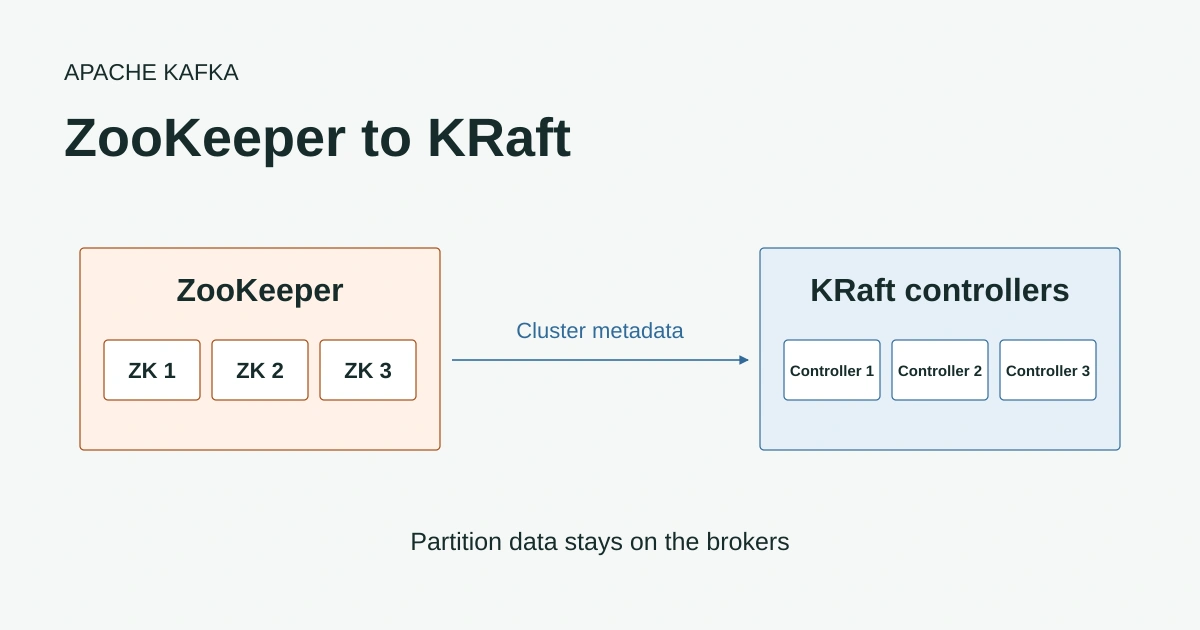
If you’re still running Apache Kafka® with ZooKeeper you’ve probably had the KRaft migration on the list for a while. It was easy to put off when 3.9 was a supported release and the cluster was working fine. That window is closing.
Kafka 4.0 removed ZooKeeper entirely in March 2025, which left 3.9 as the last release line that can run with it. The Apache project shipped 3.9.2 in February 2026 and now lists 3.9 under its archived releases alongside the 4.x releases it supports. Commercial support for 3.9-based distributions is following on behind, with Confluent Platform 7.9’s standard support ending on 19 February 2027.
There is no direct upgrade from a ZooKeeper cluster to Kafka 4. You have to migrate the cluster’s metadata to KRaft while still on 3.9 and then upgrade to 4.x as a KRaft cluster. A lot of teams who had been waiting are now planning exactly that.
The migration is well documented in the Kafka 3.9 operations guide but it helps to understand what changes at each step before you start. I ran through it on a small lab cluster running Kafka 3.9.2 with the AxonOps agent installed so we’ll follow that cluster through each phase. We’ll look at who talks to whom and the broker configuration at each step, as well as the rollback you still have available at each point.
The Shape of the Migration
The migration moves your cluster’s metadata from ZooKeeper into a quorum of KRaft controllers without taking the cluster offline. Topic data stays exactly where it is. Your partitions live on the brokers’ disks before, during and after the migration, and only the metadata (topics, partition assignments, leaders and ISRs, configs and ACLs) changes hands.
It happens in four phases.
| Phase | What changes | Metadata source of truth | Rollback |
|---|---|---|---|
| 0. ZooKeeper mode | Nothing yet: brokers on 3.9 with the protocol pinned | ZooKeeper | Not needed |
| 1. Migration mode | KRaft controllers added and brokers restarted with migration enabled | KRaft, dual-written to ZooKeeper | Yes |
| 2. KRaft brokers | Brokers restarted as KRaft brokers | KRaft, dual-written to ZooKeeper | Yes, with two rolling restarts |
| 3. Finalised | Controllers restarted without ZooKeeper | KRaft only | No |
Each phase is a rolling restart of either the brokers or the controllers. Restart one node at a time and wait for under-replicated partitions to return to zero before moving to the next so you never take more than one copy of a partition offline.
The configuration examples below use PLAINTEXT listeners to keep them short. Carry your existing security settings across and add the controller listener to them. Hostnames are shown as placeholders.
Phase 0: ZooKeeper Mode
This is where most clusters start. Every broker connects to ZooKeeper, registers itself under /brokers/ids and watches the /controller znode. Whichever broker creates /controller first becomes the controller for the whole cluster. It reads and writes metadata in ZooKeeper and pushes it to the other brokers with LeaderAndIsr and UpdateMetadata requests.
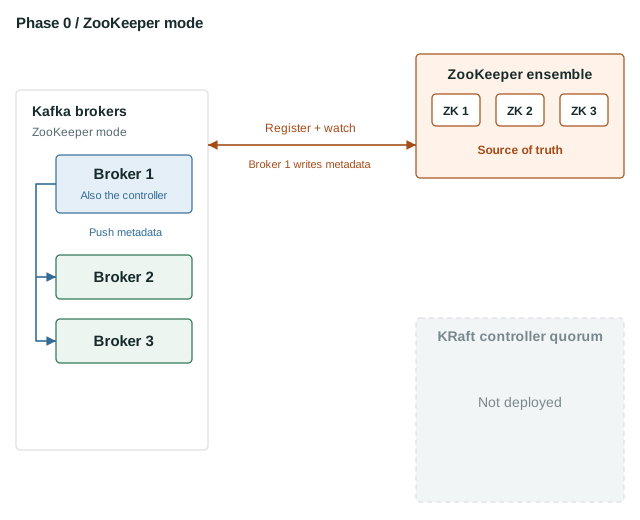
The other brokers don’t read most of their metadata from ZooKeeper themselves. They wait for the controller to send it. They do still watch ZooKeeper for dynamic config and ACL changes and for the controller disappearing so one of them can take over.
Before you go any further every broker needs to run Kafka 3.9.1 or later with inter.broker.protocol.version set to 3.9. I’d use the latest 3.9.2 release. If you’re coming from an older version that’s an ordinary rolling upgrade in its own right and it’s worth letting the cluster settle on 3.9 before starting the migration.
broker.id=1
broker.rack=rack-a

listeners=PLAINTEXT://:9092
advertised.listeners=PLAINTEXT://<broker-1>:9092
inter.broker.listener.name=PLAINTEXT

zookeeper.connect=<zookeeper-1>:2181,<zookeeper-2>:2181,<zookeeper-3>:2181
# Required before the migration can start
inter.broker.protocol.version=3.9

log.dirs=/var/lib/kafka
It’s also the time to check the migration limitations against your cluster. Brokers with multiple log directories have caveats during the migration and you can’t change the metadata version once it has started. If you use AclAuthorizer you’ll be switching to StandardAuthorizer when the brokers move to KRaft.
Rollback: nothing to roll back. The cluster is still a normal ZooKeeper cluster.
Phase 1: KRaft Controllers and Migration Mode
Phase 1 has two steps. First you provision a quorum of KRaft controllers alongside ZooKeeper. Then you restart the brokers with migration enabled.
Provision the controllers
Each controller’s node.id must be different from every existing broker.id. Three controllers is the usual minimum for production because the quorum can lose one and keep a majority.
process.roles=controller
node.id=3000

controller.quorum.voters=3000@<controller-1>:9093,3001@<controller-2>:9093,3002@<controller-3>:9093
controller.listener.names=CONTROLLER
listeners=CONTROLLER://:9093
advertised.listeners=CONTROLLER://<controller-1>:9093

# The brokers' listener, which the controller uses to send them requests
inter.broker.listener.name=PLAINTEXT
listener.security.protocol.map=PLAINTEXT:PLAINTEXT,CONTROLLER:PLAINTEXT

zookeeper.metadata.migration.enable=true
zookeeper.connect=<zookeeper-1>:2181,<zookeeper-2>:2181,<zookeeper-3>:2181

log.dirs=/var/lib/kafka-controller
The controllers have to join the cluster the brokers already belong to so you format their storage with the cluster ID from ZooKeeper rather than generating a new one.
bin/zookeeper-shell.sh <zookeeper-1>:2181 get /cluster/id
bin/kafka-storage.sh format --cluster-id <cluster-id> --config controller.properties
Start the controllers. They’ll form a quorum and wait because no brokers have been restarted with migration enabled yet.
This is a static quorum. Every broker and controller lists the voting controllers in controller.quorum.voters, so adding or replacing a controller later means changing that list on every node and restarting them. Kafka 3.9 also supports a dynamic quorum, where the voters are stored in the metadata log and you change them with add-controller and remove-controller while the cluster runs. A static quorum can’t be converted to a dynamic one on 3.9, but Kafka 4.1 added an upgrade path. You can migrate with the simpler static setup and switch to a dynamic quorum once you’re on 4.1 or later.
Enable migration on the brokers
Next roll the brokers with migration enabled and the location of the controller quorum added. They’re still ZooKeeper-mode brokers so broker.id, zookeeper.connect and the protocol version stay.
broker.id=1
broker.rack=rack-a

listeners=PLAINTEXT://:9092
advertised.listeners=PLAINTEXT://<broker-1>:9092
inter.broker.listener.name=PLAINTEXT

zookeeper.connect=<zookeeper-1>:2181,<zookeeper-2>:2181,<zookeeper-3>:2181
inter.broker.protocol.version=3.9

# Added in phase 1
zookeeper.metadata.migration.enable=true
controller.quorum.voters=3000@<controller-1>:9093,3001@<controller-2>:9093,3002@<controller-3>:9093
controller.listener.names=CONTROLLER
listener.security.protocol.map=PLAINTEXT:PLAINTEXT,CONTROLLER:PLAINTEXT

log.dirs=/var/lib/kafka
Each restarted broker registers with the KRaft controllers as well as in ZooKeeper. Once every broker has registered the active controller copies the existing metadata out of ZooKeeper into its metadata log in one pass. On my lab cluster that showed up in the active controller’s log as:
Completed migration of metadata from ZooKeeper to KRaft. 59 records were generated in 181 ms across 1 batches.
... The record types were {TOPIC_RECORD=2, PARTITION_RECORD=53, CONFIG_RECORD=3, PRODUCER_IDS_RECORD=1}.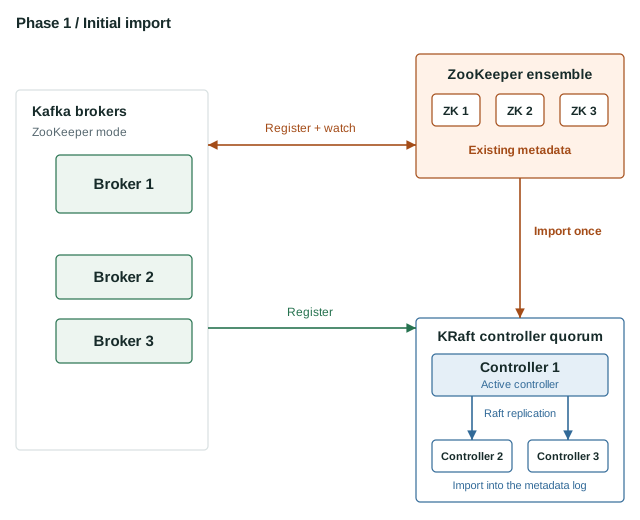
From this point the KRaft metadata log is the source of truth.
The Controller Role Moves to KRaft
In phase 0 the controller is whichever broker holds the /controller znode. Its controller code runs inside that broker alongside the broker’s normal work, and if it fails another broker takes over the znode and the role.
Once every broker has registered in migration mode the active KRaft controller claims /controller with a higher epoch, and only then copies the metadata. The broker that held the role sees it has been replaced and resigns. It carries on as an ordinary broker. Its controller code stays idle, as does every other broker’s, because none of them can win /controller while the KRaft controller holds it.
Everything the ZooKeeper-mode controller did now happens on the active KRaft controller.
- Electing partition leaders when a broker fails or shuts down
- Accepting the ISR changes brokers report with
AlterPartition - Creating and deleting topics and running partition reassignments
- Telling the brokers the results with
LeaderAndIsr,UpdateMetadataandStopReplicarequests
The brokers still expect those requests, so the KRaft controller sends the same ones a ZooKeeper-mode controller would. To the brokers it looks like a familiar controller that happens not to be a broker. Enabling migration also turns on request forwarding in the brokers, so admin requests such as creating a topic go to the KRaft controller rather than straight into ZooKeeper.
It also dual-writes every metadata change back into ZooKeeper and records its progress in the /migration znode. That’s more than a safety net in this phase. The brokers are still ZooKeeper-mode brokers and pick up dynamic configs and ACLs by watching ZooKeeper so they rely on the controller keeping it up to date.
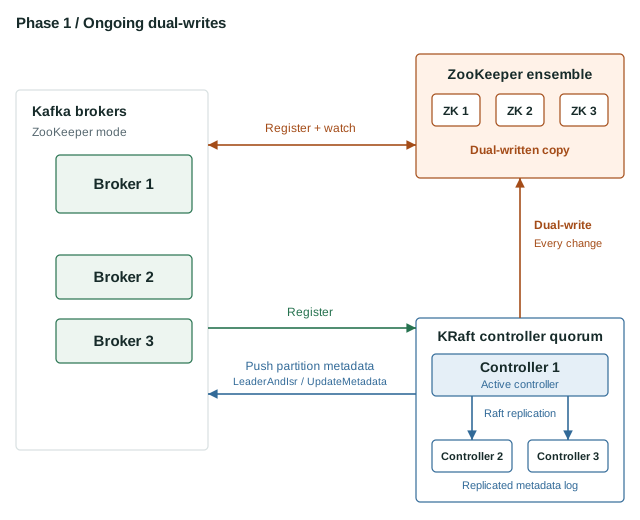
You can check the quorum and the brokers’ relationship with it from any host with the Kafka tools. Here’s the replication view from my lab, where the controllers are nodes 1 and 2 and the brokers are 3 and 4 (some columns trimmed).
$ bin/kafka-metadata-quorum.sh --bootstrap-controller <controller-1>:9093 describe --replication
NodeId  LogEndOffset  Lag  Status
1       96            0    Leader
2       96            0    Follower
3       96            0    Observer
4       96            0    Observer
The controllers are the voters (Leader and Follower) and the brokers are Observers. They’re registered with the quorum but don’t vote.
Rollback: this is the easiest point to back out. The steps depend on how far you’ve got.
- If you’ve only provisioned the controllers, shut them down and remove them. The brokers never knew they were there.
- If the brokers are running with migration enabled you need to hand the controller role back to the brokers. Shut down the KRaft controllers. Then use
zookeeper-shell.shto compareget /controller_epochwith thekraft_controller_epochinget /migrationand raise/controller_epochabove the KRaft value if it’s lower. Delete/controllerso a broker can win the election again and then read and delete/migration. Finally roll the brokers withzookeeper.metadata.migration.enableand the controller quorum settings removed.
Do the ZooKeeper steps promptly after stopping the controllers. Until /controller is deleted the cluster has no active controller so leadership can’t move if a broker fails. The controllers’ storage now contains stale metadata so wipe it before trying again.
Phase 2: KRaft Brokers
In phase 2 you restart the brokers as KRaft brokers. node.id replaces broker.id with the same number and every ZooKeeper setting comes out of the broker configuration.
# Changed in phase 2: KRaft broker, node.id replaces broker.id
process.roles=broker
node.id=1
broker.rack=rack-a

listeners=PLAINTEXT://:9092
advertised.listeners=PLAINTEXT://<broker-1>:9092
inter.broker.listener.name=PLAINTEXT

controller.quorum.voters=3000@<controller-1>:9093,3001@<controller-2>:9093,3002@<controller-3>:9093
controller.listener.names=CONTROLLER
listener.security.protocol.map=PLAINTEXT:PLAINTEXT,CONTROLLER:PLAINTEXT

log.dirs=/var/lib/kafka
Compared with phase 1 the configuration has lost zookeeper.connect and any other zookeeper.* settings as well as inter.broker.protocol.version and zookeeper.metadata.migration.enable. Remove control.plane.listener.name if you set it. If you use ACLs, this is also when authorizer.class.name changes to org.apache.kafka.metadata.authorizer.StandardAuthorizer.
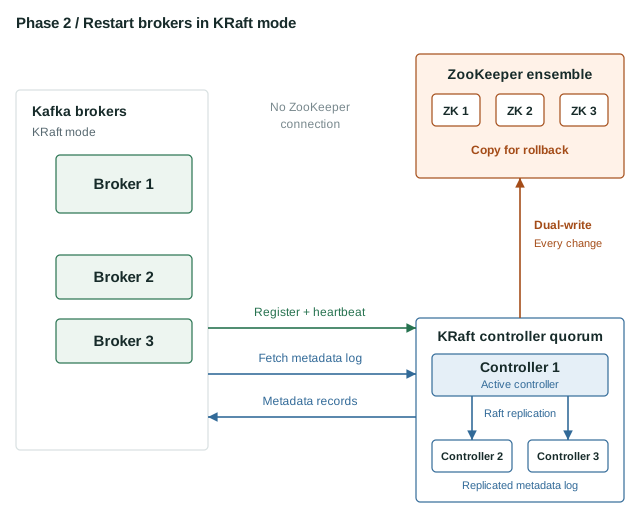
The brokers no longer talk to ZooKeeper at all. After the last broker restarted on my lab cluster /brokers/ids in ZooKeeper was empty. The brokers now register and send heartbeats to the active controller.
The way they receive metadata changes too. Instead of the controller pushing LeaderAndIsr and UpdateMetadata requests to them, each broker fetches the __cluster_metadata log from the active controller as an observer of the quorum and applies the records itself. Every broker sees the same ordered history and a broker that falls behind simply keeps fetching.
The controller is still dual-writing so ZooKeeper remains a complete copy of the cluster’s topics, partitions, configs and ACLs. Nothing reads it any more, but that copy is what lets you go back.
Rollback: still possible but it takes two rolling restarts.
- Roll the brokers back to the phase 1 configuration. Remove
process.roles, putbroker.idandzookeeper.connectback and keepzookeeper.metadata.migration.enable=truefor this roll. The brokers return to being ZooKeeper-mode brokers in migration mode. - Follow the phase 1 rollback: shut down the controllers, check the controller epoch, delete
/controllerand/migrationand then roll the brokers a second time with the migration settings removed.
The brokers’ meta.properties files are left in a format that ZooKeeper mode can still read, which is why they can go back without touching their storage.
Phase 3: Finalise the Migration
Once you’re happy with the cluster running on KRaft brokers you finalise the migration by restarting the controllers without ZooKeeper. Remove zookeeper.metadata.migration.enable and zookeeper.connect and any other ZooKeeper client settings from each controller’s configuration and roll them one at a time.
process.roles=controller
node.id=3000

controller.quorum.voters=3000@<controller-1>:9093,3001@<controller-2>:9093,3002@<controller-3>:9093
controller.listener.names=CONTROLLER
listeners=CONTROLLER://:9093
advertised.listeners=CONTROLLER://<controller-1>:9093

inter.broker.listener.name=PLAINTEXT
listener.security.protocol.map=PLAINTEXT:PLAINTEXT,CONTROLLER:PLAINTEXT

log.dirs=/var/lib/kafka-controller
The broker configuration doesn’t change in this phase. It’s the same as in phase 2.
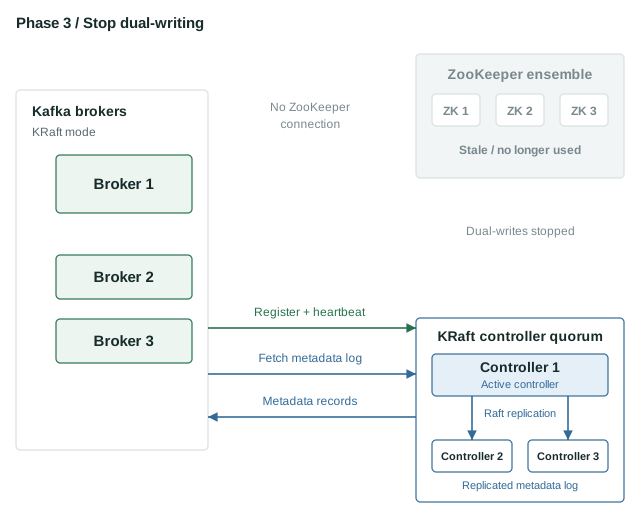
When the controllers come back the dual-write stops and ZooKeeper immediately starts to fall behind. Once every controller has restarted you can stop the ZooKeeper ensemble and decommission it.
Rollback: none. Once the migration is finalised the cluster can’t go back to ZooKeeper mode. The Kafka documentation suggests running in phase 2 for a week or two before finalising, which gives you time to put the cluster through its normal workload while the way back is still open.
With the migration finalised the cluster is an ordinary KRaft cluster on 3.9 and you can plan the rolling upgrade to Kafka 4.x.
Monitoring the Migration with AxonOps
Each phase involves rolling restarts so you want a clear view of under-replicated partitions and broker health between each node. You also want to see which controller is active as nodes come and go.
The AxonOps Kafka 3 agent (axon-kafka3-agent) supports every node type you’ll run during the migration so you can monitor the cluster with the same agent from start to finish. The Kafka agent setup guide covers installation and the agent configuration. The agent’s node_type setting tells AxonOps which role the node plays.
| Node | node_type |
|---|---|
| ZooKeeper-mode brokers in phases 0 and 1 | broker |
| KRaft brokers from phase 2 | kraft-broker |
| KRaft controllers from phase 1 | kraft-controller |
| ZooKeeper nodes | zookeeper |
The only setting that changes during the migration is the brokers’ node_type in phase 2, from broker to kraft-broker. Make that change in the same rolling restart that turns them into KRaft brokers. Configure the controllers with kraft-controller when you provision them in phase 1 so they report into the same AxonOps cluster as the brokers from the moment they start.
A Migration Dashboard
Kafka exposes two controller metrics that tell you exactly where the migration has got to. AxonOps collects both so you can put them on a custom dashboard and watch the cluster move through the phases. The Kafka query syntax guide covers the query language, which is based on PromQL.
kaf_KafkaController_ZkMigrationState{dc=~'$dc',rack=~'$rack',hostname=~'$hostname'}
kaf_KafkaController_MigratingZkBrokerCount{dc=~'$dc',rack=~'$rack',hostname=~'$hostname'}
ZkMigrationState reports the migration state as a number. The numbers don’t follow the order of the phases, so it’s worth adding the mapping to the chart’s description.
| Value | State | When you’ll see it |
|---|---|---|
| 4 | ZK | Phase 0. The controller is a ZooKeeper-mode broker and the migration hasn’t started. |
| 2 | PRE_MIGRATION | Phase 1. The KRaft controllers are running and waiting for every broker to register in migration mode. |
| 1 | MIGRATION | From the metadata copy in phase 1 until you finalise. The controllers are dual-writing to ZooKeeper. |
| 3 | POST_MIGRATION | Phase 3. The migration is finalised. |
| 0 | NONE | A cluster created in KRaft mode. You won’t see it on a migrated cluster. |
MigratingZkBrokerCount is the number of brokers registered with the controller that are still running in ZooKeeper mode. It rises during the phase 1 roll as each broker restarts with migration enabled, and the metadata copy starts once every broker has registered. In phase 2 it falls back to zero as each broker restarts as a KRaft broker.
Read together they tell you what to do next. When the state is 1 and the broker count reaches zero, every broker is running in KRaft mode and the cluster is ready to finalise. The state stays at 1 through phase 2 on my lab cluster. Its metadata log held a PRE_MIGRATION record followed by a MIGRATION record and nothing after it, even with both brokers running in KRaft mode. It only changes to 3 when you restart the controllers without migration enabled.
Kafka also reports ZkWriteBehindLag from the active controller during the migration. It counts how many records ZooKeeper is behind the metadata log, so it’s a useful third chart while you’re relying on the dual-written copy for rollback.
When you move to Kafka 4 after finalising, replace axon-kafka3-agent with axon-kafka4-agent. Kafka 4 has no ZooKeeper mode and the Kafka 4 agent is built for it.
Summary
| Phase | Brokers talk to | Controllers talk to | ZooKeeper is | Rollback |
|---|---|---|---|---|
| 0 | ZooKeeper and each other | Not running | The source of truth | Not needed |
| 1 | ZooKeeper, the controllers and each other | Each other, the brokers and ZooKeeper | A dual-written copy that brokers still read | Remove the controllers and roll the brokers |
| 2 | The controllers and each other | Each other and ZooKeeper | A dual-written copy kept for rollback | Two rolling restarts of the brokers |
| 3 | The controllers and each other | Each other | Stale and ready to decommission | None |
The migration is a series of rolling restarts, and every phase until the last can be reversed. The step to take carefully is phase 3 so give the cluster time in phase 2 and make sure you’re happy before you finalise. Our KRaft architecture guide explains how the controller quorum and metadata log work once you’re there.