
Cassandra relies on timestamps to decide which version of a value to keep so the clocks on your servers affect the data your applications read. A clock that’s a few seconds ahead can make an earlier write take precedence over the update that should have replaced it.
Most Linux deployments already have a time service running by the time Cassandra is installed. It’s worth checking which sources that service uses and whether the application hosts follow the same policy because they may be generating the write timestamps themselves.
Let’s work through how that affects Cassandra and how to configure and check time synchronization without introducing clock jumps on a running database.
Write Timestamps and Clock Drift
For ordinary Cassandra writes the version with the highest timestamp wins when two values for the same cell need reconciling. These timestamps have microsecond resolution but that doesn’t mean the machines generating them agree to within a microsecond.
Suppose two application servers update the same customer’s delivery instructions and the first server’s clock is five seconds ahead. The timestamps below are shown as times of day to make the comparison easier to follow.
| Actual order | Application clock | Value written | What Cassandra keeps |
|---|---|---|---|
| First write at 10:00:00 | 10:00:05 | Leave at reception | This value has the higher timestamp. |
| Second write at 10:00:02 | 10:00:02 | Deliver to loading bay | The later update has a lower timestamp so it loses. |
Both requests can succeed even though a subsequent read returns the first value. Replication and repair use those stored timestamps too so they won’t work out that the application intended the second request to replace the first.
Where does the timestamp come from? It can be supplied explicitly by the application or generated by its driver. Cassandra’s coordinator supplies one when the request doesn’t provide it. The Java driver’s timestamp documentation explains its client-side generation and why separate clients can still disagree about time.
Include the application hosts in your time-sync checks alongside the Cassandra nodes. TTL expiry also depends on server time so clock drift can affect when a value stops being visible. Keeping the clocks synchronized reduces these errors but doesn’t give ordinary writes a guaranteed global processing order.
Configuring Chrony
Chrony provides the chronyd service that adjusts the system clock and the chronyc command used to inspect it. Both Chrony and ntpd support NTP so you don’t need a different protocol to use Chrony with an existing time service.
Start by checking what’s installed rather than adding another service that will try to adjust the same clock. Cloud images often arrive with provider-specific settings that you’ll want to retain.
| Distribution | Install if needed | Main configuration file | Check the service |
|---|---|---|---|
| Ubuntu and Debian | sudo apt install chrony | /etc/chrony/chrony.conf | systemctl status chrony |
| RHEL and compatible distributions | sudo dnf install chrony | /etc/chrony.conf | systemctl status chronyd |
The Ubuntu guide also covers included source files and sources supplied through DHCP. Check those as well as the main file so you know which servers are actually being used. The equivalent RHEL guidance covers the chronyd service and its configuration.
If your organisation runs its own NTP servers you could use the following source entries on Cassandra and application hosts. Replace the example names with your actual servers and retain the distribution’s drift-file and logging settings.
server ntp1.example.net iburst
server ntp2.example.net iburst
server ntp3.example.net iburst
The iburst option speeds up initial synchronization. Three or four independent sources let Chrony compare measurements and reject a source that disagrees with the others as described in its configuration FAQ. Three servers that all follow the same faulty upstream still share that failure so check where their time comes from.
Don’t append this example to a cloud provider’s configuration without checking compatibility. A provider may deliberately expose one managed endpoint and its leap-second policy can differ from your other sources.
Clock Adjustments on a Running Node
Chrony normally corrects the clock gradually by changing its rate. You’ll also often find the following setting in a packaged configuration.
makestep 1.0 3This allows a clock jump when the correction exceeds one second during the first three clock updates after Chrony starts. Restarting the service starts that allowance again even if Cassandra has been running for weeks. The makestep documentation recommends limiting steps to boot before time-sensitive programs start.
Clock jumps on live Cassandra nodes
Check clock-step settings before restarting the time service on a live Cassandra node. Correct a large startup offset before Cassandra begins accepting requests and use a planned maintenance procedure if a running node needs a substantial clock correction.
Checking Synchronization
A running service doesn’t tell you whether it has a usable time source so check the measurements as well as its process status.
chronyc tracking
chronyc sources -v
The Chrony command reference explains the fields in both reports. These are the ones I’d check first.
| Field | What to check |
|---|---|
System time in tracking | The correction still remaining between the system clock and Chrony’s estimate of time. |
Last offset and RMS offset | Whether recent offsets are settling or getting larger. |
Leap status | Not synchronised needs investigation even when the service is running. |
* in sources | The selected source. Other sources marked + contribute to the combined estimate. |
Reach | 377 means replies arrived for the last eight polls. A falling value suggests lost responses. |
LastRx | How long ago a usable measurement arrived. |
An unreachable source could be a DNS problem or blocked NTP traffic on UDP port 123. Check those before changing polling intervals. Compare the readings across nodes and application hosts so a healthy-looking result on one machine doesn’t hide a problem elsewhere.
Choose alert thresholds based on your workload and the accuracy you can sustain. There isn’t one clock-offset limit that makes every Cassandra application safe because two writers can update the same cell closer together than that limit.
Cloud Time Sources
Use your cloud image’s supported time configuration as the starting point and check it against the provider’s instructions before replacing it with a generic NTP example.
AWS
EC2 instances can reach Amazon Time Sync Service through the link-local address 169.254.169.123 without an internet connection. The corresponding Chrony source entry is shown below.
server 169.254.169.123 iburstSupported Linux instances can also use a PTP hardware clock. AWS documents an important difference between them because its NTP service smears leap seconds while the direct PTP clock does not. Keep that difference in mind before configuring one as a fallback for the other.
Google Cloud
Google Cloud provides its internal NTP service at metadata.google.internal and uses a 24-hour leap smear. Its NTP configuration guide explicitly advises against mixing this source with external services that may handle leap seconds differently.
server metadata.google.internal iburstIf your application writers run outside Google Cloud they need compatible time handling too. Google Public NTP uses the same smear as the internal service.
Azure
Azure exposes host time to supported Linux guests through a PTP device. Check the image’s existing settings because the device named /dev/ptp0 isn’t necessarily the Hyper-V clock when more than one PTP device is present.
Microsoft’s Linux time-sync guide recommends the stable /dev/ptp_hyperv link and provides this Chrony entry.
refclock PHC /dev/ptp_hyperv poll 3 dpoll -2 offset 0 stratum 2Check that the link exists before using it. The Microsoft guide explains how to identify the Hyper-V clock and configure the link on older images. Loading ptp_kvm isn’t the setup procedure for Azure’s Hyper-V time source.
Internal NTP Servers and Multiple Data Centres
An internal NTP service gives you control over the sources used by Cassandra and its clients. Spread the servers across failure domains and give them reliable upstream references so losing one host or network path doesn’t remove time synchronization from the whole cluster.
Configure clients to query those servers using the server entries shown earlier. Chrony can compare the available sources without requiring a fully peered NTP mesh. The peer directive doesn’t establish trust by itself and the Chrony security guidance recommends client/server mode instead.
You may see local stratum 10 in examples for isolated networks. It allows a server to advertise synchronized time without a working external reference so don’t add it as a general resilience setting. That behaviour needs deliberate planning for an isolated environment as explained in the RHEL isolated-network configuration.
Stratum describes the number of steps from a reference clock and doesn’t provide an accuracy score for the server.
| Level | Meaning |
|---|---|
| Reference clock, often called stratum 0 | A reference such as a GNSS receiver or atomic clock. It isn’t an NTP server that clients query directly. |
| Stratum 1 | An NTP server connected directly to a reference clock. |
| Stratum 2 | A server synchronized through a stratum 1 server. Each further level adds another step. |
For a multi-DC Cassandra deployment you can use local NTP sources to reduce dependence on WAN paths. Those sources still need to follow a common time policy across data centres because writes generated in either location will eventually be reconciled using their timestamps. Include backup sources and application hosts in that policy rather than treating each DC’s clocks as an isolated group.
Linux Clocksources
The Linux clocksource measures elapsed time between clock updates. It works alongside NTP and you can inspect the selected source without changing anything.
cat /sys/devices/system/clocksource/clocksource0/current_clocksource
cat /sys/devices/system/clocksource/clocksource0/available_clocksource
A physical x86 server may use the Time Stamp Counter (TSC) while a virtual machine may use a hypervisor-provided source. A different name doesn’t by itself indicate a problem.
Avoid forcing clocksource=tsc or adding tsc=reliable as routine Cassandra tuning. The kernel parameter documentation explains that tsc=reliable disables stability checks. Investigate kernel warnings and the platform’s guidance before overriding its clocksource selection or changing CPU power settings.
Leap Seconds
Leap seconds adjust UTC to account for changes in the Earth’s rotation. A time service can handle the adjustment directly or spread it over a period through a leap smear. During that period a smeared clock intentionally differs from unsmeared UTC.
The problem for Cassandra is having writers follow different versions of time during the adjustment. Adding an unrelated public NTP server as a fallback can introduce exactly that disagreement even though both services work correctly on their own.
Check the leap-second behaviour of your primary and backup sources together. AWS warns against mixing its smeared NTP service with its unsmeared PTP clock during a leap second. Google gives similar guidance about mixing its smear with external services. Two services offering a smear also need to use compatible schedules before you combine them.
Chrony’s normal gradual correction doesn’t mean it automatically slews every leap second. Its leapsecmode setting controls that behaviour so check the actual configuration across your database and application hosts.
Monitoring Clock Drift with AxonOps
AxonOps includes NTP drift monitoring so you can check clock offsets alongside Cassandra’s other operational metrics. The agent compares the host clock with an NTP reference while Chrony remains responsible for adjusting the clock.
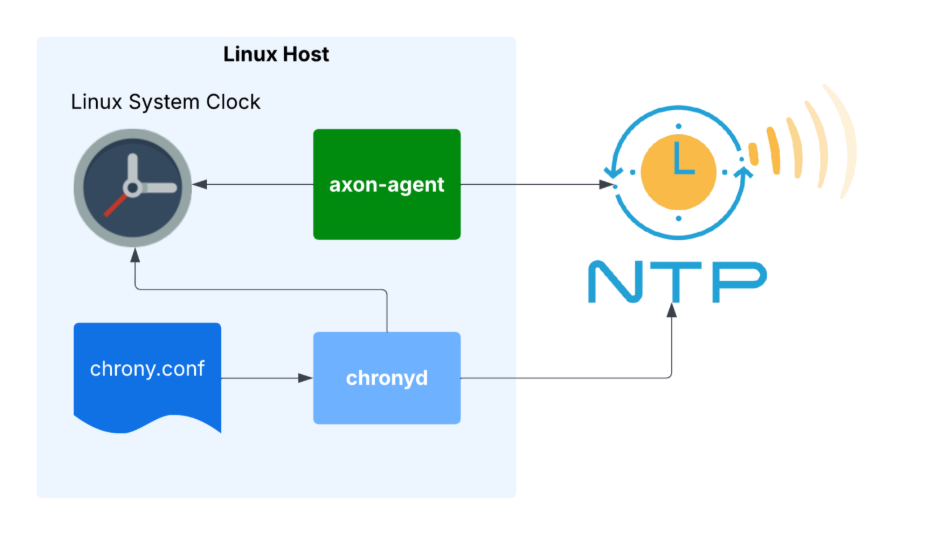
Make sure monitoring uses the intended reference too. The agent setup instructions explain how to specify NTP hosts in /etc/axonops/axon-agent.yml when auto-detection fails or Cassandra runs in Kubernetes. This also lets you use your organisation’s dedicated NTP service.
Set an offset alert that’s appropriate for your application and investigate a growing offset before it affects writes. If future-dated writes have already reached Cassandra then fixing the host clock won’t change their stored timestamps. You’ll need to examine the affected data as well.
Checks for Your Cluster
These are the checks I’d include when provisioning Cassandra hosts and reviewing an existing deployment.
- Confirm where application write timestamps are generated and include those hosts in time monitoring.
- Verify the active time sources and their reachability on every Cassandra node.
- Keep primary and backup sources compatible across data centres and cloud providers.
- Check clock-step settings before restarting Chrony on a live node.
- Review offset trends and alerts rather than relying on the time service being active.
Once those checks are part of provisioning you can repeat them after an image update or a change to the network. That gives you a way to catch a changed time source before you’re investigating why an application’s newer writes aren’t appearing.